For years, the ability to style web components based on the size of their immediate parent container sat at the absolute top of web developers’ wishlists. Today, CSS Container Queries enjoy broad cross-browser compatibility, reaching approximately 94% global browser support according to data from Can I Use. Yet, despite solving one of the most persistent architectural hurdles in responsive web design, the feature remains surprisingly underutilized across the software development industry.
Data from the recent State of CSS survey reveals a striking disconnect between developer awareness and practical adoption. While 86% of surveyed developers reported knowing what container queries are, only 41.4% actively use them in production projects. While survey results represent a specific subset of the front-end community, industry experts confirm that actual implementation lags far behind expectation.
Addressing the audience at SmashingConf Amsterdam 2026, web designer and educator Kevin Powell noted that adoption of container queries has been unexpectedly sluggish across the web ecosystem. The core issue, according to front-end specialists, stems from a fundamental misunderstanding of how container queries operate—specifically, a tendency to treat them as mere substitutes for traditional CSS media queries rather than an entirely different layout paradigm.
To understand why container queries are so often implemented incorrectly, it is necessary to examine how media queries operate, why they struggle with modern component-driven design systems, and how looking "inward" allows UI components to react intelligently to their immediate surroundings.
Container Queries Look Inward
For more than a decade, responsive design relied almost exclusively on media queries. When developers write a traditional media query—such as querying a minimum width of 1024 pixels—they are asking the browser a single question: how wide is the overall browser window right now?
Media queries use the viewport as a proxy for available space. This mental model worked effectively during the era of simple web pages, but it falters in modern web application development, which relies heavily on modular, highly reusable component architecture.
When a multi-column content card component governed by a media query is placed in a main page grid on a large desktop monitor, it works as intended. However, if that exact same card component is reused inside a narrow sidebar or a condensed grid column on that same desktop screen, the media query fails to adapt logically. Because the overall screen width remains wide (for instance, 1920 pixels), the browser triggers the viewport-based breakpoint, forcing a wide, multi-column card into a 300-pixel sidebar slot. The result is cramped text, overflow errors, and broken visual layouts.
As Kevin Powell noted regarding the inherent blind spot of viewport-based styling, media queries do not possess intrinsic context about component environments; most developers simply assume media queries know more about local layout constraints than they actually do.
Container queries solve this by shifting the perspective inward. Instead of relying on the global viewport, container size queries allow an element to evaluate the space available inside its designated parent container.
Consider a standard implementation:
.card-wrapper
  container-name: card;
  container-type: inline-size;


@container card (min-width: 450px)
  .card
    display: flex;
    flex-direction: row;
In this setup, the card component completely ignores screen dimensions. It evaluates only whether its immediate parent wrapper offers at least 450 pixels of horizontal (inline) space. If the parent container provides that space—whether on a mobile device or inside a wide hero section on a desktop screen—the card adopts a horizontal row layout. If the available space falls below 450 pixels, such as when placed inside a desktop sidebar, the card defaults to a stacked vertical block layout.
"Macro" Layout Vs. "Micro" Layouts
Distinguishing when to use traditional media queries versus container queries comes down to differentiating between "macro" and "micro" layouts.
Media queries remain the ideal tool for macro layouts—the high-level structural framework of a webpage. They excel at managing page-wide architecture, such as switching a global site layout from a single column to a multi-column grid, adjusting site-wide headers and footers, reacting to device capabilities like touch input, or detecting system-level user preferences such as preferred color schemes (prefers-color-scheme).
Conversely, container queries are designed specifically for micro layouts—the self-contained elements that inhabit the macro page structure. Components such as media cards, interactive forms, navigation widgets, pricing tables, and user profiles benefit directly from container queries. Rather than altering a component based on an arbitrary screen width threshold like 768 pixels, container queries enable elements to change layout dynamically based on the space allocated to them in real time.
This architectural shift is critical given the fragmentation of modern hardware. Research from viewports.fyi, which analyzed over 120,000 data points, identified more than 2,300 unique viewport sizes in active use across the web today. Attempting to manage component presentation across thousands of screen configurations using global media queries creates brittle, unmaintainable stylesheets. Placing layout decisions directly on the container allows content density to govern presentation naturally.
Example: Fluid Typography Inside A Component
Managing typography across varying container sizes illustrates the practical difference between media queries and container queries. Historically, developers used viewport units like vw alongside CSS functions such as clamp() to achieve fluid typography:
.card-title
  font-size: clamp(100%, 1rem + 2vw, 24px);
While this formula scales font sizes based on screen width, it creates visual defects when a component moves into a constrained sub-layout. A title inside a card placed in a desktop sidebar will render excessively large because 2vw continues to calculate based on the massive monitor size rather than the narrow sidebar width.
Container queries introduce dedicated container query length units, including cqi (container query inline size), cqw (container query width), and cqb (container query block size). Combining these units with clamp() binds typography scaling directly to the container:
.card-title
  font-size: clamp(1rem, 0.5rem + 3cqi, 2rem);
By referencing cqi instead of vw, the heading scales in perfect proportion to the specific container holding the component, ensuring typographic consistency regardless of where the element is rendered on the page.
Example: Flexbox Wrap Detection
Container queries also offer native solutions for layout challenges that previously required custom JavaScript logic, such as detecting when CSS flex items wrap onto a new line.

CSS Flexbox handles layout distribution smoothly via flex-wrap: wrap, automatically dropping items onto a secondary line when horizontal space runs out. However, standard CSS lacks a native pseudo-class or media query (such as a hypothetical :wrapped selector) to detect when that wrapping event occurs and apply custom styling to wrapped items. Historically, developers relied on JavaScript’s ResizeObserver API to monitor element widths and toggle conditional CSS classes.
By nesting container queries within flex items that are set to expand, developers can detect layout wrapping using pure CSS. By combining flex-grow: 1 with a container query on the flex item, the item expands to fill the full width of the row once it wraps, triggering the container breakpoint.
/* The flex parent container */
.flex-layout
  display: flex;
  flex-wrap: wrap;


/* Register each flex item as an inline container */
.flex-item
  container-type: inline-size;
  flex: 1 1 390px; /* Expands to fill space; wraps below 390px */


/* Default card presentation for narrow states */
.card
  display: flex;
  flex-direction: column;
  background: #f4f4f4;


/* Styles applied when the wrapped item expands to fill full container width */
@container (min-width: 600px)
  .card
    flex-direction: row;
    align-items: center;
    background: #e2f0d9;
When multi-column items are squeezed and eventually wrap onto their own standalone rows, flex-grow: 1 causes the wrapped item to take up the entirety of the newly available line width. That sudden increase in the item’s inline size triggers the @container query, updating the item’s internal layout without a single line of JavaScript.
Container Queries Do Have Side Effects
Despite their flexibility, container queries introduce specific technical mechanics and limitations that developers must account for during implementation.
1. Containers Cannot Query Themselves
Unlike media queries, which can apply conditional styles directly to any element on the page, a container query requires an ancestor-descendant relationship. An element defined as a container cannot query its own dimensions to modify its own properties.
For instance, the following CSS will fail:
/* DOES NOT WORK */
.card
  container-name: card;
  container-type: inline-size;


@container card (min-width: 400px)
  .card
    display: flex;
Allowing an element to query its own size to alter its own display properties creates an infinite layout evaluation loop: changing display properties alters the container’s size, which changes the query state, which alters the display properties again.
To prevent infinite layout loops, browsers enforce a strict rule: query targets must be descendants of the registered container. Developers must structure markup so that an outer parent acts as the container while child elements receive conditional styles:
<div class="cards">
  <div class="card">
    <div class="card-content">...</div>
  </div>
</div>
.cards
container-name: cards;
container-type: inline-size;
@container cards (min-width: 400px)
.card
display: flex;
2. Querying Block size Can Collapse Layouts
Defining a container using container-type: size instructs the browser to monitor both inline (horizontal) and block (vertical) dimensions. However, doing so without setting an explicit height on the container can cause the layout to collapse entirely:
/* Collapses element height to 0px if no explicit height is specified */
.hero-banner
  container-type: size;
To prevent infinite loops when calculating vertical height based on child content, the browser intentionally ignores child elements when determining the container’s initial block size. Without an explicit height, min-height, or aspect-ratio defined on .hero-banner, the browser calculates the container’s height as 0px.

Consequently, front-end engineers generally advise using container-type: inline-size for standard responsive web design tasks, reserving full size queries strictly for scenarios where container heights are fixed or explicitly controlled.
3. Container Breakpoints Do Not Accept Custom Properties
A current limitation of CSS container queries is their inability to accept CSS custom properties (variables) within the query declaration itself:
:root
  --breakpoint-lg: 1600px;


/* DOES NOT WORK */
@container (min-width: var(--breakpoint-lg))
  /* ... */
Because CSS custom properties depend on the DOM cascade, allowing container queries to evaluate against variables creates potential circular dependencies, as styles within the query could theoretically redefine the variable being queried.
It is also worth noting that while this discussion focuses on container size queries, browser vendors are actively working on experimental container style queries, which allow components to query computed styles (such as specific custom property values) on parent elements, as highlighted in technical analyses published by Smashing Magazine.
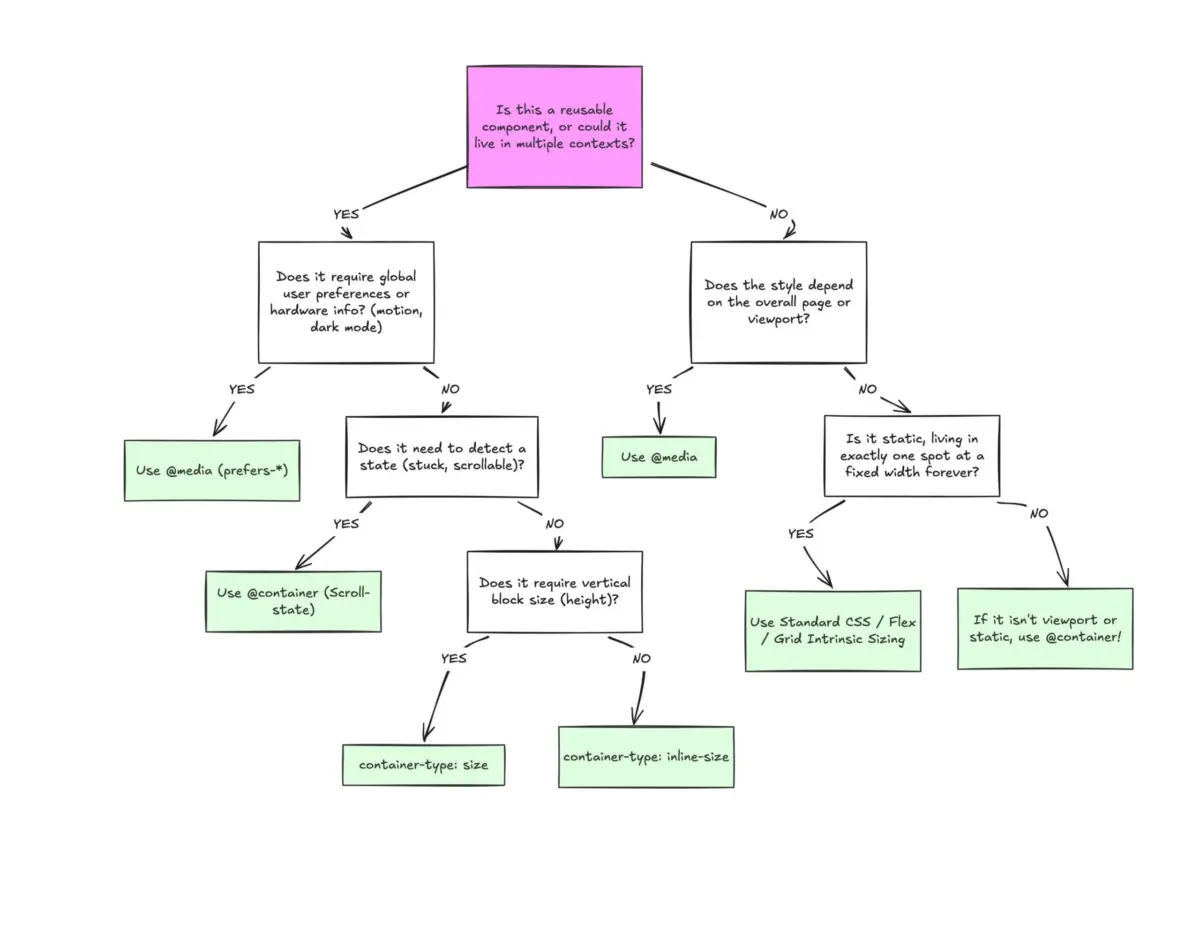
Knowing When to Use Which Query
Container queries are not meant to make media queries obsolete. Rather, both tools are designed to work together to form a modern CSS architecture.
Media queries remain the standard for macro-level decisions: top-level page grids, viewport-wide navigation controls, structural page layouts, and global media features. Container queries are designed for micro-level decisions: reusable visual components, self-contained layout structures, and fluid component typography.
                  ┌─────────────────────────────────────────┐
                  │    Determining Layout Query Strategy    │
                  └────────────────────┬────────────────────┘
                                       │
                        Is the layout logic tied to the
                        entire viewport/page structure?
                                       │
                      ┌────────────────┴────────────────┐
                      ▼                                 ▼
                   [ YES ]                           [ NO ]
                      │                                 │
                      ▼                                 ▼
           Use Media Queries (@media)     Does the component live inside
           • Global page layout           multiple distinct contexts?
           • Main navigation menus                      │
           • Color scheme preferences         ┌─────────┴─────────┐
           • Device capabilities              ▼                   ▼
                                           [ YES ]             [ NO ]
                                              │                   │
                                              ▼                   ▼
                                 Use Container Queries    Media queries may
                                 (@container)             suffice, but container
                                 • Component cards        queries offer better
                                 • Sidebar widgets        long-term component
                                 • Form modules           portability.
By moving away from evaluating viewport widths for local component layouts, developers can build truly modular UI systems that adapt seamlessly to any container context across the web.