In the ongoing evolution of user interface design, micro-interactions and subtle visual cues often dictate the boundary between a seamless digital experience and a frustrating web session. Among the most ubiquitous components found across modern mobile websites, web applications, and desktop layouts is the accordion—a collapsible container used to progressive disclose content and keep navigation structured. Despite its widespread implementation across e-commerce platforms, news portals, and enterprise software, design teams routinely struggle with a fundamental decision: which icon best signals expansion, and how should these interactive elements behave?
Extensive user experience research, including comparative usability evaluations conducted by Nielsen Norman Group (NN/g), offers concrete clarity on how end users perceive collapsible navigation components. The findings challenge several common design practices, highlighting why split menus often damage overall usability, why custom icon choices introduce unnecessary cognitive friction, and why the humble downward-pointing caret remains the most reliable visual indicator for collapsible content.
No Icon Equals Opening the Page
When designing navigation hierarchies, visual signifiers dictate user expectation. Interface research demonstrates that when a menu label appears in a list without an accompanying icon, users overwhelmingly assume that tapping or clicking on the text will navigate them directly to a new webpage. In the absence of a explicit visual indicator signaling that hidden content resides beneath the item, the user’s mental model defaults to standard hyperlink behavior.

This baseline expectation creates friction when designers attempt to introduce custom or non-standard visual indicators. Unconventional symbols often fail to communicate that an element expands inline rather than loading an external resource. When custom visual indicators are introduced without established industry precedent, users struggle to predict the outcome of their interactions.
Crucially, observational interaction data reveals an essential insight regarding touch-target distribution: across most standard icon implementations, users tap on the text label and the accompanying icon in nearly equal measure. This behavior underscores a vital design principle: icon selection does not merely alter a small visual symbol at the edge of a container—it shapes the user’s operational mental model for the entire interactive region.
Because users routinely tap the text rather than fine-tuning their touch point precisely over the adjacent icon, any ambiguity in the visual signifier compromises the entire touch target. When a link is meant to navigate directly to an independent page, the research reinforces a timeless design convention: the clearest and most effective method remains a simple, standard text underline, entirely devoid of extraneous arrows, carets, or ornamental symbols.

Confusing Behavior With Arrows and Split Buttons
A common pattern in contemporary UI component libraries is the use of right-facing or downward-pointing arrows to manage nested navigation. However, observational research reveals that directional arrows carry mixed expectations. A right-facing arrow does not consistently signal to users that clicking will load a new webpage, nor does rotating that same arrow downward reliably communicate that an inline accordion will reveal hidden options beneath it.
This ambiguity becomes particularly problematic when teams implement split buttons within navigation structures. In a split-button accordion architecture, the text label is designed to function as a direct link to a category page, while the adjacent icon is assigned a separate, distinct functional trigger intended to expand or collapse the accordion section.
Usability testing demonstrates that split menus are inherently harmful to user navigation. Because users regularly tap text labels expecting an accordion to expand—or tap icons expecting to navigate—the dual-action architecture routinely results in accidental clicks, erroneous page loads, and lost context. Users lack the fine motor control or immediate context on mobile viewports to reliably distinguish between two distinct interaction zones packed tightly within a single horizontal row.

To resolve this persistent friction, user experience research strongly advocates for single-action interaction targets. Instead of dividing a single row into two conflicting triggers, the primary row should serve exclusively to open and close the accordion panel.
For users who require access to the primary category landing page, digital architects should place an explicit overview link inside the expanded panel. Leading international brands, such as global logistics service DHL, demonstrate this model effectively within their mobile navigation layouts. In these implementations, main categories operate as straightforward expandable triggers, while internal links—such as an "Overview" link placed cleanly within the revealed menu—provide direct, unambiguous access to top-level landing pages.
Plus and Arrows Are Understood, But Can Be Misunderstood
To denote expandable and collapsible states, interface design systems historically lean on two primary symbolic pairings: plus and minus symbols (+/−) or vertical directional arrows (↓/↑). While both conventions are widely recognized across digital platforms, each carries contextual baggage that can lead to misinterpretation depending on the surrounding user interface.

The plus symbol (+), while effective in basic text accordions, suffers from extreme functional overloading across modern web ecosystems. Depending on the surrounding context, a plus icon is routinely used to represent adding an item to a shopping cart, saving content to a reading list or library, zooming in on an image, or creating a new record. In complex, multi-level navigation structures where users may expand multiple categories simultaneously, a dense column of plus and minus symbols can visually clutter the interface and confuse users regarding which structural level is currently active.
Similarly, directional arrows (↓/↑) carry multiple competing meanings across web interfaces. Users frequently associate directional arrows with page scrolling, sliding viewports, cycling through carousel items, jumping to specific anchored sections of a long page, or downloading files. While both plus/minus signs and directional arrows remain functional alternatives that users can ultimately decipher, their overloaded semantic meanings across various web software environments increase the cognitive processing time required for a user to interact confidently.
Why the Caret Remains the Gold Standard for Accordion Design
When evaluating functional reliability across diverse user groups, usability findings single out the caret—or downward-pointing solid triangle—as the safest, most effective default choice for signaling collapsible accordion content.

Unlike generic arrows or overloaded plus signs, the caret explicitly communicates a dynamic relationship between a header and a hidden tray of content beneath it. In usability tracking, the caret is the only icon pattern where user interaction shifts distinctly: users demonstrate a higher specificity in targeting the caret icon directly when intending to expand content, demonstrating a clearer baseline comprehension of its function.
The standard interaction model recommended by design research dictates displaying a downward-pointing caret (▼) in the default collapsed state. Upon user interaction, the indicator seamlessly transitions to an upward-pointing caret (▲) or a rotated sideways caret (►) to reflect the newly expanded state of the container.
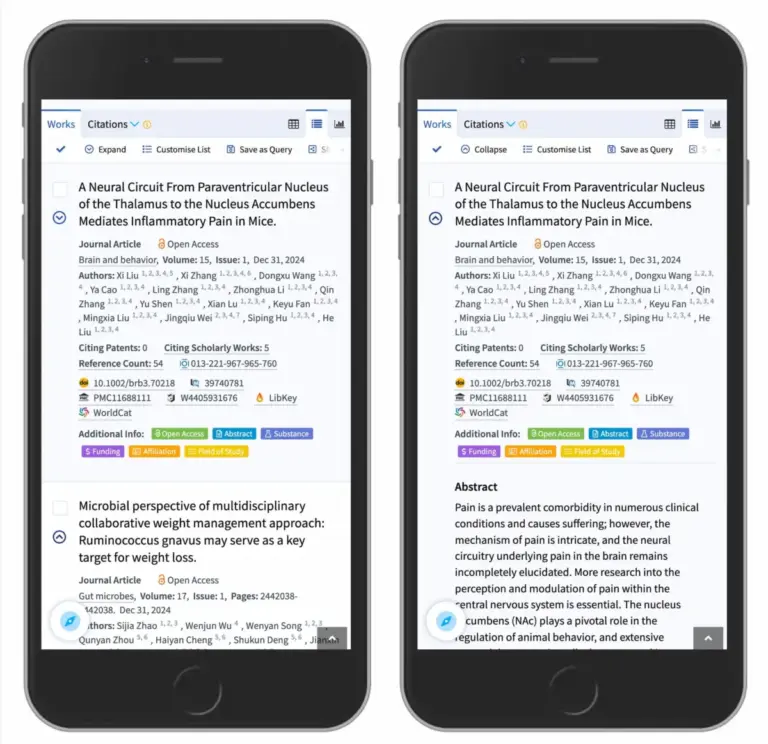
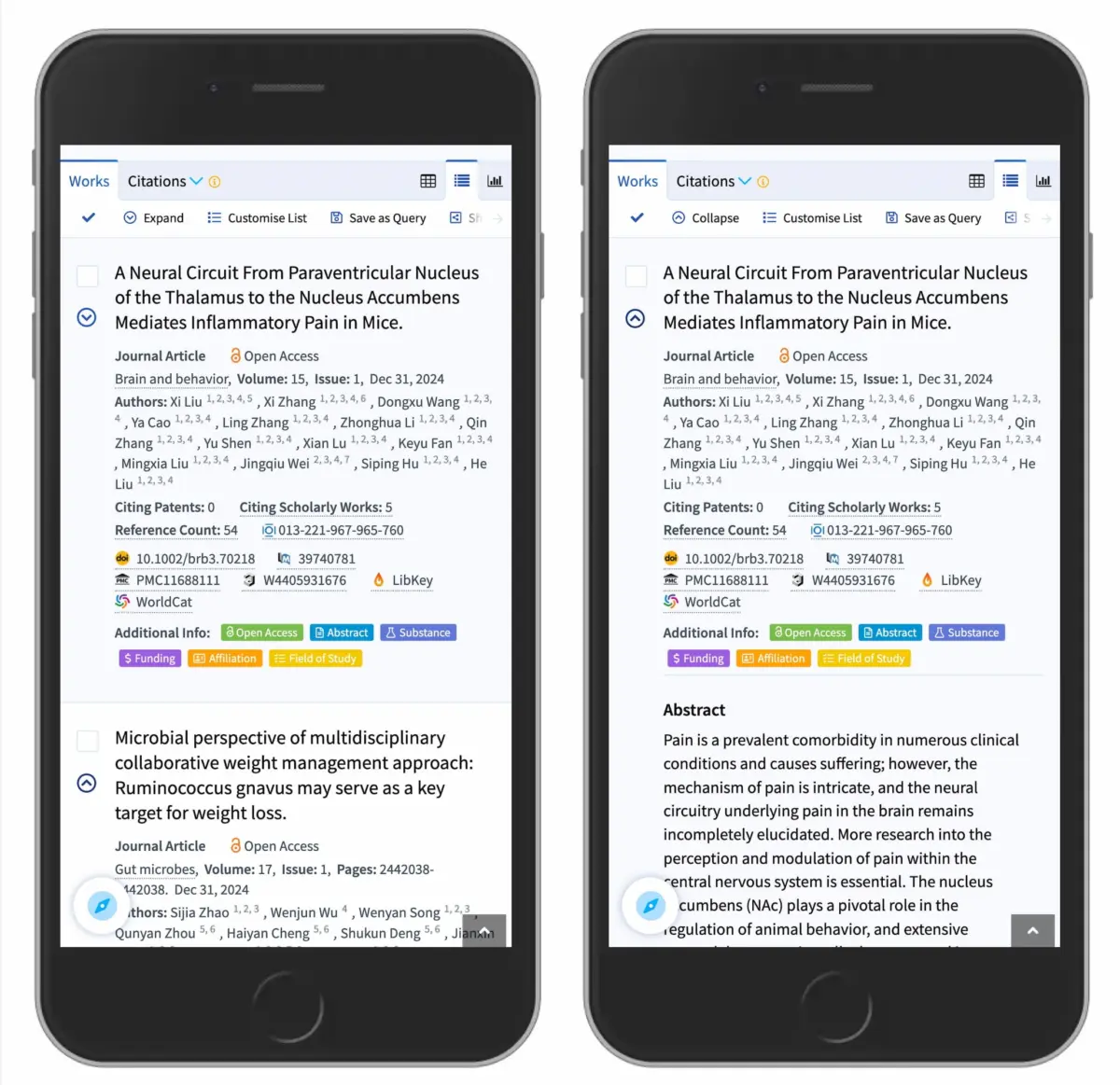
This clear binary state change provides immediate visual feedback without overloading the interface with competing metaphors. High-density information platforms and search engines rely heavily on this pattern to manage complex data views efficiently. For example, academic research engine Lens.org utilizes downward carets within its mobile search result interfaces to allow researchers to rapidly inspect abstract summaries and publication details inline without forcing a full page reload or disrupting the primary search flow.

Ultimately, effective interaction design relies on reducing operational uncertainty. By abandoning split-button mechanics in favor of single-action accordion triggers, reserving text underlines for true page links, and selecting carets as default expansion signifiers, digital product teams can construct intuitive navigation systems that operate seamlessly across all devices.
The Broader Impact on Web Standards and Accessibility
The refined guidelines emerging from interface research reflect a broader movement across the digital design community toward streamlined, highly accessible design systems. As web software scales across diverse screen sizes, assistive technologies, and international audiences, eliminating unnecessary UI complexity is no longer merely an aesthetic preference—it is a core functional requirement.
Design organizations and web engineering publications, including Smashing Magazine, regularly highlight the necessity of standardizing core interaction patterns. By reducing complex UI components to their most basic, single-purpose implementations, creators ensure that digital tools remain fully accessible to users relying on screen readers, key-based navigation, or touch interfaces.

Whether designing large-scale e-commerce navigation, complex administrative dashboards, or public informational archives, adhering to predictable, research-backed component behaviors ensures that the modern web remains universally usable and intuitive for everyone.