For years, component-based responsiveness stood at the absolute top of web developer wishlists. Designers and frontend engineers regularly complained about the limitations of traditional media queries, calling for a native CSS mechanism that would allow individual UI elements to adapt based on their own available space rather than the width of the entire browser window.
Today, CSS Container Queries are fully standardized and available across all major rendering engines, boasting roughly 94 percent browser support worldwide. Yet, despite this near-universal availability and high industry awareness, real-world adoption remains surprisingly sluggish—and misuse of the feature remains widespread across the web development ecosystem.
Data from the State of CSS survey reveals a striking paradox in modern web engineering: while 86 percent of surveyed developers report being aware of container queries, only 41.4 percent actually incorporate them into production code. Although developer surveys inherently carry selection bias, the metrics remain the clearest indicator available regarding how modern layout tools are utilized in practice.
The underlying problem was highlighted by web developer and educator Kevin Powell during a presentation at SmashingConf Amsterdam, where he noted that container query adoption has been unexpectedly poor. The core issue, experts argue, stems from a persistent mental model trap: developers routinely mistake container queries for traditional media queries simply because their syntax looks almost identical. Consequently, many engineers attempt to apply container queries using the exact same architectural paradigms they have relied on for over a decade, undermining the unique capabilities the technology provides.
Container Queries Look Inward
To understand why container queries are frequently misapplied, developers must first examine the inherent limitations of standard media queries. For years, the browser viewport has served as a convenient proxy for layout decisions. Media queries fostered an industry-wide assumption that screen width alone dictates how responsive user interfaces should adapt to their surrounding environment.
When a developer writes a standard media query—such as @media (min-width: 1024px)—they are asking the browser a single structural question: how wide is the screen right now? While media queries answer that question reliably, they operate with complete context blindness regarding internal component placement.
For instance, consider a standard user interface card component configured via media queries to switch from a stacked vertical layout to a horizontal side-by-side flexbox layout whenever the viewport reaches 1024 pixels. If that card is subsequently placed inside a narrow 300-pixel sidebar on a 1920-pixel desktop display, the media query still evaluates as true because the overall viewport remains 1920 pixels wide. The component attempts to render its horizontal layout within the cramped 300-pixel constraint, resulting in overflowing text, cropped images, and distorted UI elements.
As Powell noted in an analysis for CSS-Tricks, media queries are fundamentally limited not because the concept is flawed, but because they possess no knowledge of localized layout constraints—even though developers frequently assume they do. Traditional responsive design often treats layout adjustments purely as a system for macro page restyling, such as dropping a multi-column desktop template down to a single column on mobile screens.
Container queries address this fundamental flaw by shifting the responsive calculation inward. Instead of relying on the global browser viewport, container queries evaluate local layout conditions by asking how much space is available within a specific container at any given moment.
By registering a parent element as a container using container-type: inline-size and assigning it a container-name, child elements can evaluate their environment relative to that parent container using @container rules. Under this model, a card component no longer cares whether the user is browsing on a mobile device, a tablet, or an ultra-wide desktop monitor. Its display characteristics are driven entirely by whether its immediate parent container provides enough horizontal inline space—such as 450 pixels—to support a expanded layout. If sufficient room exists, the component displays horizontally; if space is constrained, it gracefully falls back to a stacked vertical block layout.
Macro Layouts vs. Micro Layouts
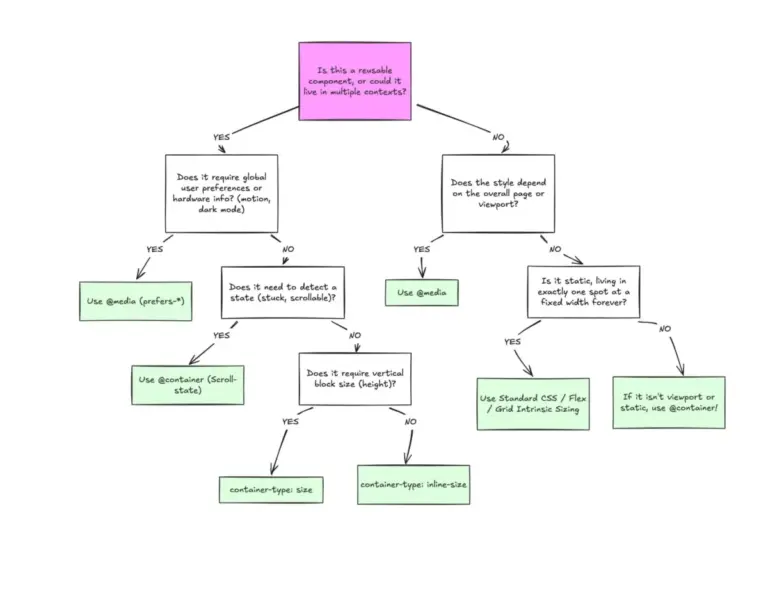
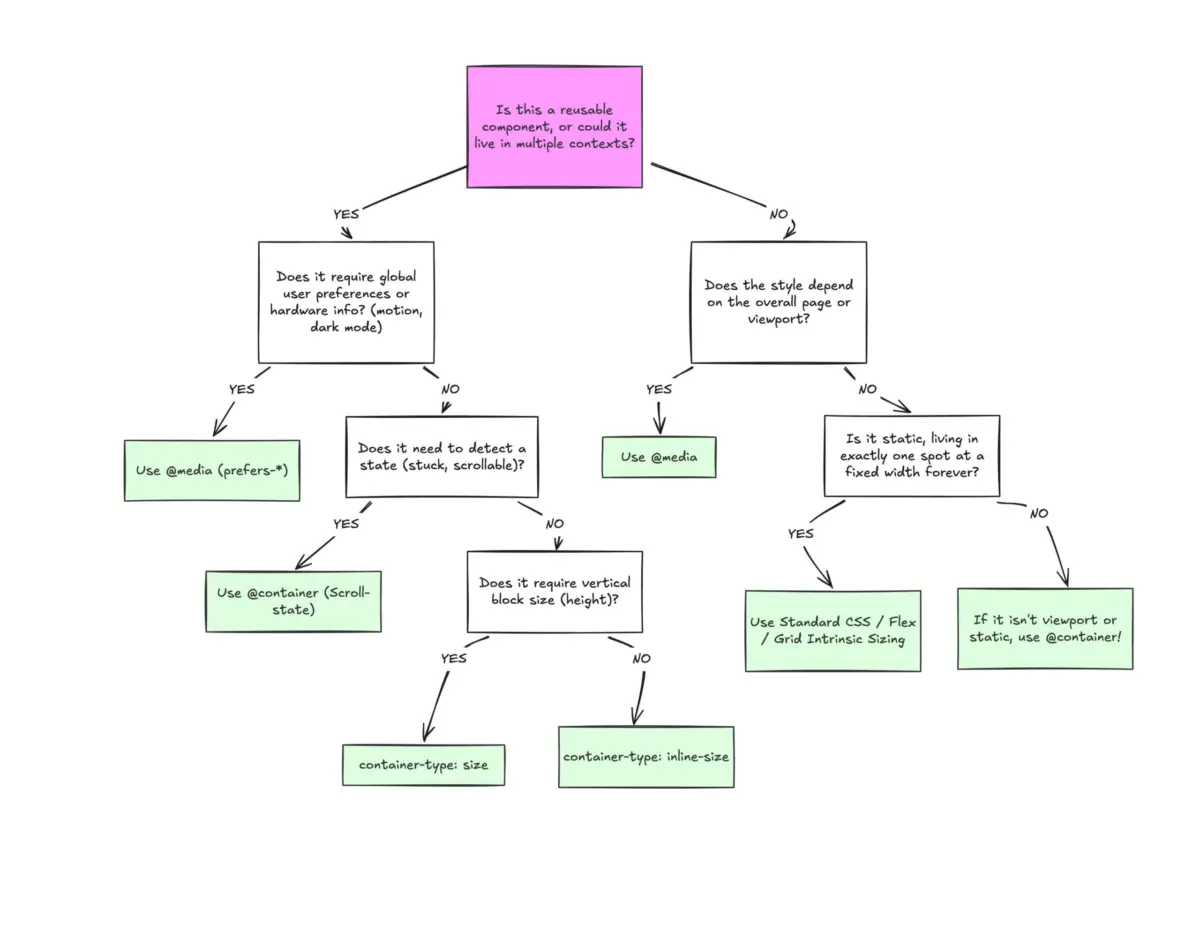
Understanding when to deploy media queries versus container queries ultimately comes down to distinguishing between macro layouts and micro layouts.
Media queries remain the ideal tool for macro layouts—the structural framework that governs the entire web page. This includes top-level page architecture, full-width headers, site footers, main CSS Grid systems, screen orientation, and global browser-level preferences like user color schemes (prefers-color-scheme) or input device capabilities. These conditions represent broad architectural truths that apply to the page as a whole.
Conversely, container queries are engineered specifically for micro layouts—the modular components that reside inside the macro framework. Cards, media objects, interactive forms, dynamic widgets, and contextual navigation bars all benefit from container-driven logic because their internal layouts must adapt fluidly to whatever content region they happen to occupy.
This distinction is crucial given the extreme fragmentation of modern hardware displays. Data collected by viewports.fyi from over 120,000 data points identified more than 2,300 unique viewport dimensions currently in active use across the web. Attempting to manage component design by mapping custom media query breakpoints to hundreds of abstract device widths is an impossible strategy. In an era dominated by component-driven design systems and reusable UI libraries, layout logic must sit as close to the individual container as possible, allowing content constraints rather than arbitrary viewport thresholds to dictate design structure.

Fluid Typography Inside a Component
The distinction between viewport-relative design and container-relative design becomes particularly apparent when managing responsive typography. Historically, developers relied on viewport units such as vw or vh alongside the CSS clamp() function to create fluid text scales that adjust smoothly as the screen resizes.
A typical viewport-driven typographic scale might use a rule like font-size: clamp(100%, 1rem + 2vw, 24px). While this approach works reliably when a headline spans the full width of the viewport, it collapses when the surrounding component is moved into a constrained context, such as a multi-column dashboard grid or a narrow secondary sidebar. Because the font scaling remains anchored to the screen width rather than the component’s available inline space, the text can grow disproportionately large relative to its small container, breaking the layout.
Container queries resolve this issue by introducing dedicated container query length units, including cqi (container query inline size), cqw (container query width), and cqb (container query block size). By pairing these container-relative units with clamp(), developers can establish true component-level fluid typography:
.card-title
  font-size: clamp(1rem, 0.5rem + 3cqi, 2rem);
In this setup, one unit of cqi equals one percent of the container’s inline size. As the parent wrapper expands or contracts, the headline scales smoothly within the exact bounds dictated by its local layout context, remaining completely independent of global viewport changes.
Flexbox Wrap Detection
Another distinct advantage of container queries is their ability to respond implicitly to dynamic layout shifts within flexbox containers. Standard CSS lacks native mechanisms to detect when flex items wrap onto a new line; there is no CSS selector or pseudo-class like :wrapped to inform developers that a layout transition has occurred.
Historically, identifying when a flex item wrapped to a new row required JavaScript utilities like ResizeObserver. Media queries cannot assist in these scenarios because flex item wrapping is an internal layout calculation driven by available item width rather than global screen dimensions.
However, by combining container queries with standard Flexbox behavior, developers can create pure CSS wrap-detection patterns. By declaring a flex item as an inline container (container-type: inline-size) and allowing it to grow dynamically using flex-grow: 1, the item automatically expands to fill the full width of the container the moment it wraps onto its own row.

.flex-layout
  display: flex;
  flex-wrap: wrap;


.flex-item
  container-type: inline-size;
  flex: 1 1 390px;


.card
  display: flex;
  flex-direction: column;
  background: #f4f4f4;


@container (min-width: 600px)
  .card
    flex-direction: row;
    align-items: center;
    background: #e2f0d9;
When multiple items sit side-by-side on a wide row, each flex item container remains narrow, keeping the internal card in its default vertical stacked arrangement. But as the parent container shrinks and forces an item to wrap onto a new line, that wrapped item expands to claim the available horizontal space. That sudden increase in inline size triggers the inner @container query, automatically switching the card to its horizontal layout without requiring a single line of JavaScript.
Container Queries Do Have Side Effects
Despite their flexibility, container queries introduce specific technical constraints and layout side effects that developers must account for to avoid silent failures.
The most common implementation error stems from the requirement for a strict parent-descendant relationship. An element cannot style itself based on its own container dimensions. Attempting to define container-type: inline-size on a .card class and then targeting .card directly inside an @container block creates a circular evaluation loop that the browser simply ignores. Because styling an element can alter its size, a container cannot evaluate its own dimensions to determine its own styles. To apply container query rules to a card component, developers must place a container declaration on a parent wrapper element—such as a .card-wrapper or grid cell—and query that parent to style the descendant card.
A second critical edge case involves full dimensional block size queries using container-type: size. When an element is configured to monitor both its inline and block dimensions, the browser calculates the container’s structural boundaries without evaluating the size of its child elements to prevent infinite layout loops. If the container lacks an explicit CSS height, min-height, or aspect-ratio, its height immediately collapses to zero pixels—even if it contains substantial nested content. For this reason, industry best practices recommend relying almost exclusively on container-type: inline-size unless explicitly engineering a component that requires vertical block-size tracking within fixed-height containers.
Finally, container query rules cannot currently evaluate CSS Custom Properties (variables) within query expressions. Declarations such as @container (min-width: var(--breakpoint-lg)) fail because CSS variables depend on computed values that cascade down the DOM tree. Allowing container logic to read variables that could theoretically be modified by the query itself would introduce severe cascading loops. While experimental specifications like container style queries—which allow elements to adapt based on computed CSS style values—are currently under development, size queries remain strictly anchored to concrete layout units like pixels, rems, or inline measures.
Ultimately, integrating container queries successfully requires recognizing that they are not meant to replace media queries entirely, but rather to complement them. Media queries remain the proper choice for macro-level architectural controls and system settings, while container queries provide the localized intelligence required for modular, context-aware components. By applying each tool to its proper domain, engineering teams can build robust design systems that adapt predictably across every layout context on the modern web.