When a product team at a major health insurer set out to streamline the workload for benefits appeals specialists, the objective seemed straightforward. The team developed an artificial intelligence feature designed to write complete, formal written determinations for appeals cases. Technically, the system performed exactly as intended. It produced coherent, structured drafts in seconds.
Yet once deployed, the feature produced an unexpected outcome. Specialists quickly abandoned the system. Those who continued to use it spent significantly more time on each case than colleagues who ignored the tool entirely.
A brief evaluation with the specialists revealed the underlying breakdown. Carefully reading an AI-generated determination to ensure its legal and medical accuracy before signing it took roughly the same amount of time as writing the document from scratch. More critically, specialists were forced to scrutinize the text for novel errors and hallucinated details—mistakes they would never make themselves. Rather than alleviating labor, the feature introduced a taxing new review process to a workflow the specialists had already mastered.
The product team eventually rescued the initiative by radically altering its scope. A second iteration shifted the AI’s responsibility entirely: instead of writing the final determination, the system was tasked with searching for and surfacing the specific policy provisions and prior rulings relevant to each appeal. The writing was left entirely to the specialist.
Under the revised design, manual search time disappeared, overall review duration plummeted, and core decision-making remained with the human experts. The underlying AI technology was identical in both releases; the sole variable was which specific segment of the task the technology was assigned to handle.
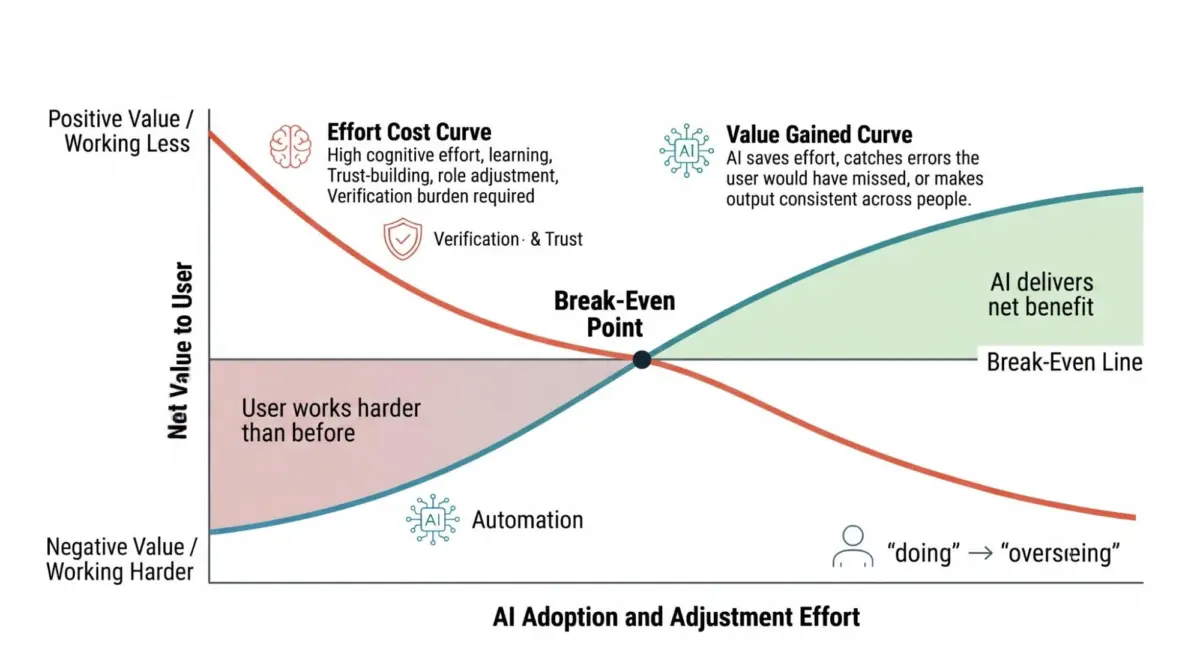
Finding The Break-even Line
Every modification to a software interface imposes a cognitive cost on the user before delivering value. Users must reconstruct their mental model of the software, adapt to revised layout structures, and evaluate the degree to which they can rely on automated outputs.
Psychological research highlights the strict boundaries of human processing capacity. Nelson Cowan’s 2001 review of working memory literature established that individuals can hold only about four distinct items in mind simultaneously. Navigating a revised interface, adopting new habits, and evaluating AI output all draw from this single, limited cognitive reservoir.
In enterprise software environments, integrating an AI feature places far greater demands on a user than a routine menu redesign, as it fundamentally alters daily workflows. Assigning task synthesis to an automated system reframes the human worker as an auditor. Delegating recommendations to the machine shrinks the human role to signing off on system decisions.
Both transitions demand substantial user attention. For skilled professionals whose specialized training constitutes their professional standing, these shifts can also register as a loss of agency. In a 2025 study conducted by Sophia Ackerhans and colleagues, physicians asked to approve AI-assisted clinical decisions reported a notable threat to their professional identity. Intriguingly, providing explanations for the AI’s underlying reasoning simultaneously increased physician trust and heightened that perceived threat.
An AI feature earns its place in a workflow only when the value it returns exceeds the cognitive and operational effort required by the user to adapt to it. This threshold can be understood as the break-even line.
Value returned to users typically takes three distinct forms: time saved through automation, reduced mental effort, or errors caught that would have otherwise slipped through.
An AI-driven fraud detection platform illustrates the error-prevention return in practice. Analyzing flagged transactions requires significant user focus to evaluate anomalies an analyst might never have noticed manually. However, because the system catches critical fraud risks, the improved detection rate justifies the additional review effort, pushing the feature well above the break-even line.
To locate this break-even line before committing engineering resources, product teams can evaluate four foundational questions. Each question generates a specific design condition to guide development.
These questions do not replace broader business considerations such as budget, strategic priorities, or existing technical debt. Instead, they provide a structured framework to evaluate user impact.
Product teams should evaluate all four questions collectively, as no single inquiry resolves the integration decision on its own. This review should occur during the initial proposal phase before design cycles begin. Crucially, the process requires direct input from individuals who perform the target work daily—such as loan officers, data analysts, or insurance specialists. A concise discussion with practitioners quickly reveals where cognitive load actually resides and whether a proposed feature eliminates work or adds to it.
Question 1: Does This Reduce The Total Effort The Task Takes For This User?
Evaluating a task requires accounting for every demand placed on the user, including abstract analysis, interface mechanics, and the ongoing verification required once AI is introduced. Tracking button clicks alone is an insufficient metric; an interface can cut physical interactions while dramatically increasing mental workload. Any increase in cognitive effort must be documented, as subsequent criteria may reveal offsetting benefits.
Consider a loan officer reviewing 40 financial disclosure documents to identify three that violate lending policy. The manual task requires high cognitive exertion, making an AI feature that automatically flags those three conflicts a direct reduction in user effort.
By contrast, entering a standardized loan identification number into a tracking platform requires minimal time and virtually no cognitive energy. Pre-filling that field with an automated prediction merely shifts the operational load rather than removing it, as the officer must now verify the machine’s accuracy.
While conventional product management advice suggests automating repetitive tasks, pre-filling simple fields often fails because verification costs exceed manual entry costs. Teams can identify viable candidates for automation by calculating total effort before and after integration, ensuring post-automation verification work is fully accounted for.
User experience also varies significantly based on individual expertise. A single feature may clear the break-even line for a novice practitioner while failing for an experienced senior worker.
If an AI tool generates a synthesized risk summary for a junior analyst, it provides a valuable baseline that the analyst lacks the experience to construct independently. However, if a senior analyst reads that same automated summary, they will systematically cross-check it against their established mental model, spending minutes verifying the text without gaining new insight.
Identifying these discrepancies allows product teams to define target user profiles accurately and scope features specifically to the user segments they genuinely benefit.
Design condition: Name the user segment the addition serves, and design an exit for the other segments.
Question 2: Does This Beat The Way The User Does The Task Now?
A proposed AI integration must be benchmarked directly against a user’s existing workflow, including informal workarounds, personal spreadsheets, and custom shortcuts.
AI integration offers clear advantages when tasks involve genuine ambiguity, such as exploring broad options, generating initial concepts, or detecting subtle patterns across extensive datasets. Scale, processing speed, and organizational consistency represent additional advantages, as does catching errors that established methods consistently miss.
However, the advantage disappears when a user already possesses a fast, highly practiced path to a definitive answer.
For example, an enterprise human resources software team developing a succession planning tool may find contrasting answers within different modules of the same application.
Using AI to identify internal job candidates with uncommon skill combinations delivers clear value. The task involves high ambiguity and massive scale, as manual evaluation of an entire corporate workforce would take weeks and lacks a single "correct" answer.
Conversely, generating automated notification emails once a candidate is selected provides little value over existing methods. HR managers already utilize established templates, drafting an email takes under two minutes, and managers hold firm preferences regarding tone and messaging. While candidate search justifies AI integration, automated email drafting layers unnecessary software interactions onto a step that operates efficiently without AI.
Determining data input methods and structural output formats requires distinct evaluations. A task containing genuine ambiguity may still demand a structured visual display rather than a conversational interface.
Design condition: Remove AI from any step where the user’s current method already reaches the answer quickly and reliably.
Question 3: Can The User Catch The Errors?
Because all artificial intelligence systems are prone to errors, product teams must evaluate whether users can reliably detect system mistakes. This assessment requires examining error visibility, the real-world consequences of undetected failures, and whether users retain the domain expertise necessary to identify discrepancies.
Error visibility varies dramatically across tasks, and development teams frequently overrate a user’s ability to spot automated mistakes.
An AI itinerary planner that recommends a venue on a day it is closed presents an invisible error; the generated output appears plausible, and the traveler discovers the mistake only upon arriving at a locked entrance. Conversely, an itinerary suggesting a departure flight that leaves prior to an incoming connection presents an overt contradiction visible directly on the screen.
The presence of automation bias exacerbates invisible errors. A comprehensive review of human factors research by Raja Parasuraman and Dietrich Manzey in 2010 demonstrated that individuals consistently defer to automated outputs even when those outputs are incorrect. This phenomenon occurs across complex fields, including aviation, healthcare, and industrial control systems. User trust in automated systems often develops rapidly and unconsciously, causing operators to drop the critical scrutiny necessary to identify system failures.
Product teams should map out potential failure modes before committing to design specifications by identifying the primary error categories, rating each by visibility and potential impact. Any scenario combining low error visibility with high operational risk creates an absolute design requirement.
Addressing this requirement involves establishing detailed provenance—showing users precisely where information originated and how the system produced its results. Providing source documentation, underlying data, and retrieval timestamps enables users to calibrate their trust appropriately. A traveler informed that business operating hours were pulled from a cache six months old knows to verify the detail, whereas an unreferenced, confident assertion leaves the user unable to evaluate accuracy.
Design condition: Any addition with a high-consequence, low-visibility error surface ships with provenance display and verification prompts, or it does not ship.
Question 4: After A Year Of Using This, Can The User Still Tell When The AI Is Wrong?
Automating repetitive operational steps provides undeniable value. Preserving a worker’s manual ability to perform basic mechanical calculations or file formatting is unnecessary when technology reliably absorbs those routine tasks.
However, the professional judgment required to audit automated output must remain intact. That expert oversight makes delegation safe, and like any complex skill, critical judgment degrades when left unused over extended periods.
Research in medical imaging demonstrates how rapidly automated recommendations can override human expertise. In a 2023 study led by Thomas Dratsch, 27 radiologists evaluated mammograms alongside an experimental setup presented as an AI assistant. Participants completed an initial 10-image training sequence where automated prompts were consistently accurate, followed by 40 mammograms in which incorrect AI suggestions were intentionally placed in 12 cases.
The results highlighted that incorrect AI suggestions significantly impaired diagnostic accuracy across all experience levels. Highly experienced radiologists, averaging 15 years in practice, achieved an 82.3% diagnostic accuracy rate when presented with correct AI prompts, but their accuracy fell to 45.5% when presented with false suggestions. For less experienced radiologists, accuracy dropped from 79.7% to 19.8%.
While extensive experience reduced susceptibility to erroneous outputs, it failed to prevent performance degradation. Extending such automation over a full year—where underlying expert judgment remains unexercised—leaves professionals less equipped to spot errors than when they began.
While the previous question evaluates current user verification capabilities, product teams must project those capabilities 12 months into the future. Systems that neglect long-term skill retention often fail not because of underlying model degradation, but because human oversight has systematically eroded through disuse.
Product managers must evaluate whether a practitioner will retain the expertise required to audit system outputs after a year of continuous automated assistance. If the answer is negative, the workflow must incorporate mechanisms that actively exercise verification skills.
Implementing periodic blind reviews—where practitioners form independent evaluations prior to viewing AI outputs—provides a low-cost method for maintaining diagnostic rigor. Similarly, systematically routing a portion of cases to manual processing or conducting recurring comparisons between human and automated outputs ensures essential critical thinking skills remain active.

Design condition: Name the mechanism that keeps verification skill in use, and build it into the workflow itself. A slide in the training deck will not do it.
Evaluating AI Adoption Strategy: The Decision Framework
Evaluating proposed AI implementations across these four core criteria allows product teams to establish clear operational paths, translating analytical findings directly into functional software requirements:
- Total Effort Assessment: When a task requires synthesizing vast inputs and complex judgment creates operational bottlenecks, AI cleared the break-even line. Conversely, if a task relies on an established manual workflow or if verifying outputs requires as much effort as manual execution, AI adds friction. Product teams must identify the specific target user segment and implement explicit exit options for non-target users.
- Method Comparison: AI delivers clear value when it outperforms existing user workarounds through superior handling of ambiguity, scale, execution speed, data consistency, or error detection. If established user methods reach reliable outcomes quickly, AI integration adds unnecessary complexity. Development teams should strip automated features from steps already handled efficiently by manual methods.
- Error Catchability: When system errors are self-evident, operational risks are minor, and corrections are straightforward, AI integration is easily justified. If errors remain subtle, operational stakes are high, or verification requires specialized expertise, integration poses significant risks. Development plans must enforce compulsory provenance displays and verification prompts; otherwise, the feature should be shelved.
- Long-Term Skill Retention: If AI processes high operational volumes while reserving core analytical decisions for human experts, user verification capabilities remain stable over time. If the system absorbs critical judgment without feedback mechanisms, user auditing skills systematically degrade. Development teams must build active skill-retention mechanisms directly into the operational software.
Translating these criteria into concrete design briefs turns abstract user research into enforceable project specifications. Teams frequently reduce complex integration choices to binary decisions under roadmap pressures, discarding valuable UX insights.
A feature that performs well regarding effort reduction but presents high error risks must proceed only if explicit provenance display is integrated from the start. Specifying these functional requirements early ensures they are treated as core architecture rather than superficial polish that risks cancellation when release deadlines tighten.
Running The Audit On The Appeals Scenario
Re-evaluating the insurance appeals scenario demonstrates how this audit framework operates in practice. The initial release failed the total effort assessment. Because drafting an insurance determination requires focused cognitive effort, generating automated text merely redirected user energy into detailed proofreading, failing to reduce overall task time. A preliminary evaluation would have exposed this inefficiency before design work
began.
Comparative evaluation yields similar conclusions. Insurance appeal determinations strictly follow standardized administrative formats, allowing specialists to complete drafts through highly practiced routines. The genuine complexity occurs earlier in the process—specifically, locating applicable policy terms and relevant prior decisions scattered across corporate repositories.
The error visibility assessment further underscores the risk profile. An incorrect coverage determination directly impacts patient care, and errors embedded within polished prose are difficult to spot during routine review. This risk profile justified the provenance specifications built into the second version of the system, which required explicit citations and retrieval dates for every policy cited.
Long-term skill preservation explains why the revised tool proved sustainable. Because specialists continued drafting final determinations, their core analytical skills remained in daily use. Retaining the initial version would have systematically trained specialists over time to approve automated text without exercising the critical judgment required to catch subtle errors.
The Same Audit On Meeting Summaries
Applying the framework to automated meeting summaries—a feature now widely deployed across enterprise collaboration platforms—yields a distinctly different outcome.
Evaluating total task effort shows that automated summaries eliminate manual note-taking while introducing a small verification task: confirming whether decisions were attributed correctly. For passive meeting participants who rarely take notes, total effort drops significantly. For dedicated note-takers, the operational trade-off is narrower, as verification duty falls on them. The framework surfaces this distinction clearly.
Comparing automated summaries with existing user habits highlights clear benefits. Manual note-taking during multi-person discussions frequently produces fragmented documentation. AI summaries consistently outperform manual efforts in structural consistency and contextual completeness across recurring meetings.
However, error visibility presents notable risks. An action item incorrectly assigned to the wrong team member appears visually identical to a correct assignment, and participants rarely review full meeting transcripts to verify accuracy. Because visibility is low and operational impact can be significant, the framework dictates a clear design requirement: attaching interactive source timestamps directly to generated action items.
Finally, evaluating long-term skill retention indicates minimal operational risk. Automating meeting summaries does not degrade essential analytical skills, and participants retain full responsibility for operational decision-making.
The evaluation yields clear direction: feature implementation proceeds, interactive source timestamps are included in the baseline release, and adoption metrics among primary note-takers are monitored post-launch.
The 60-minute Version Of The Audit
Product teams can execute a targeted version of this evaluation before allocating roadmap resources to proposed AI features.
In his landmark 2003 research on organizational innovation, sociologist Everett Rogers defined "pro-innovation bias" as the implicit assumption that deploying new technological capability inherently represents progress before tangible benefits are demonstrated. In corporate software development, competitive market pressures frequently turn a competitor’s product announcements into internal mandates. Conducting a structured one-hour evaluation provides teams with an objective framework to analyze these external pressures.
To execute the rapid evaluation:
- Convene the core product team alongside at least one active domain practitioner.
- Spend 15 minutes walking through the target task step-by-step, detailing current manual workarounds and cognitive friction points.
- Dedicate 30 minutes to working through the four evaluation questions, systematically documenting potential failure modes, error risks, and target user profiles.
- Use the final 15 minutes to translate the findings into explicit design conditions or scope modifications.
Bringing The Results Into The Room
Presenting evaluation findings to executive stakeholders requires clear, constructive framing. Framing audit results as reasons to cancel a project often prompts pushback; presenting findings as definitive design conditions shifts the conversation toward actionable scope management.
Start by clearly identifying the specific user segment the feature effectively serves, establishing that the proposal delivers clear ROI for a defined group. Next, frame error surfaces as technical requirements with associated development costs. Product managers can readily evaluate concrete requirements—such as integrating source timestamps for automated attributions—whereas broad concerns regarding user trust are difficult to prioritize.
Finally, offer clear scope adjustments proactively. Modifying an insurance tool to surface relevant legal provisions rather than writing complete determinations results in a smaller initial build, lower risk, and a superior adoption path.
A clear approach for product discussions: "This capability delivers clear value for onboarding junior analysts, but adds verification steps for senior staff. We recommend scoping the initial rollout specifically to junior analyst workflows and evaluating broader deployment next quarter."
Human cognitive capacity remains fixed regardless of model performance. Before committing to the next AI feature, product teams must calculate the total cognitive cost imposed on the user and identify the specific value return that offsets that cost. Entering roadmap reviews with both metrics clearly defined enables teams to deliver software that reliably clears the break-even line.