Ever since the commercial debut of the Graphical User Interface (GUI) on systems like the Xerox Star and its subsequent mainstream adoption through the original Apple Macintosh, digital software has depended heavily on point-and-click mechanics. For more than four decades, interacting with software has meant navigating dense menus, adjusting numeric range sliders, filling out multi-step forms, dismissing cookie consent banners, and managing dozens of open browser tabs simply to synthesize basic information. Internet users have long been conditioned to spend a substantial portion of their digital lives managing software mechanics rather than directly achieving their underlying goals.
That foundational paradigm is now undergoing a fundamental shift. Accelerated by rapid developments in artificial intelligence and large language models, a new class of web tools is establishing an operational philosophy known as Intent-Driven Design. Rather than forcing users to master intricate navigation trees or proceed through multi-page sales funnels, these modern platforms are engineered to capture high-level human objectives and perform the mechanical steps silently in the background.
This movement builds directly upon established human-computer interaction (HCI) concepts, including Golden Krishna’s core assertion that "The Best Interface Is No Interface" and Don Norman’s long-standing principles of human-centered design. Under this evolving model, the primary ambition of digital product design is shifting away from building visually elaborate controls toward eliminating interface friction altogether.
For user experience (UX) professionals, this shift marks a pivotal turning point. Designers are increasingly required to re-evaluate their traditional responsibilities, moving away from crafting static visible interfaces toward architecting transparent, intent-directed AI interactions.

The Death Of The "10-Click" Process
To understand the trajectory of modern web design, it is necessary to examine the operational friction that digital platforms have treated as standard practice for decades.
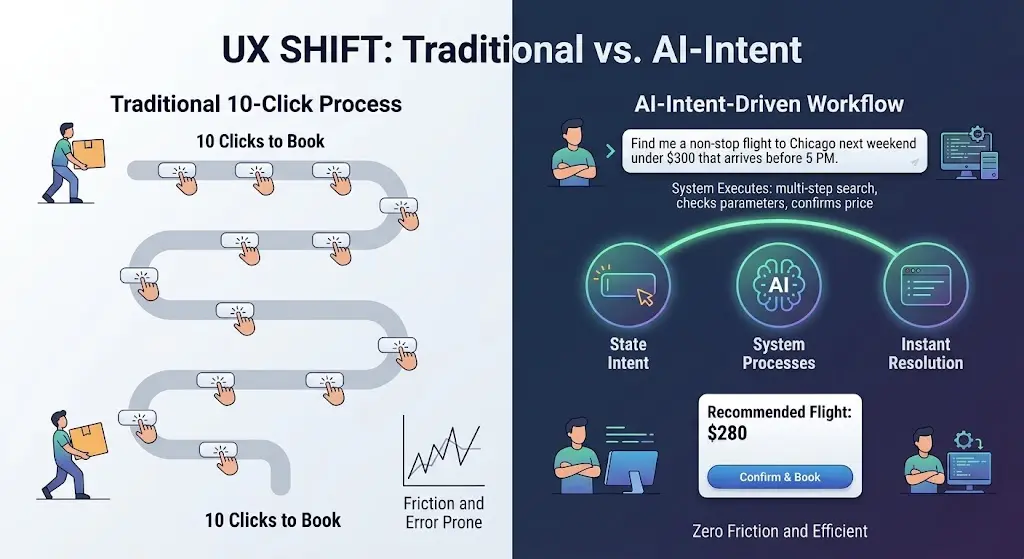
Consider the conventional process of purchasing an airline ticket online. The standard user flow relies entirely on a dense, point-and-click interaction model. The user selects departure and destination cities, opens calendar overlays to choose dates, toggles flight time preferences, adjusts budget sliders, compares multiple carrier options across separate windows, selects seat configurations, and inputs payment and personal identity details across sequential screens. In this traditional framework, the computer serves as a passive data repository, while the human acts as the operational orchestrator—manually entering parameters, processing raw output, and managing every micro-step of the workflow.
Intent-driven design reverses this relationship. Instead of requiring the user to navigate the technical sequence of how to retrieve and filter flight data, the software centers on a singular question: what is the user trying to accomplish?
When a user provides a high-level command—such as requesting a non-stop flight to Chicago next weekend under $300 that arrives before 5:00 PM—the intent-driven platform interprets the goal, runs the required multi-parameter database queries behind the scenes, compares available inventory, and returns a refined, actionable resolution. The traditional ten-click sequence is compressed into a single expression of intent, shifting the operational burden from human input to system execution.
Three Web Platform Examples Replacing Buttons With Intent
This transformation is no longer restricted to theoretical research; it is actively being deployed across consumer and developer platforms. Several prominent web tools demonstrate how intent-based capture is replacing point-and-click interface structures.
1. Perplexity AI: Search Without The Open Tabs
Traditional web search engines were designed primarily as indexed link directories. A standard keyword search generated a page of indexed links, leaving the user to open multiple tabs, evaluate article credibility, dodge display advertisements, and manually extract relevant details. While incumbent engines like Google have begun embedding automated AI overviews at the top of query results, the legacy interface model still relies heavily on link navigation.
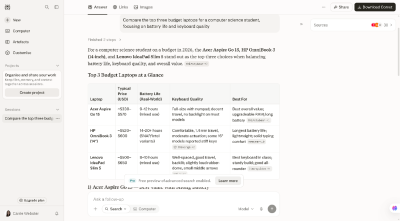
Perplexity AI alters this workflow by operating as an intent-based search platform. Rather than presenting a list of external pages for the user to navigate, the system processes the user’s core question, synthesizes content across multiple web sources simultaneously, and delivers a consolidated answer tailored to the context of the prompt, bypassing the need for manual tab management.
2. Vercel v0: Web Design Without Dragging And Dropping
For decades, digital product design and layout creation required direct manual manipulation using software tools such as Figma or visual web page builders. Designers spent hours manually drawing vector containers, entering hexadecimal color formulas, calculating spacing and padding variables, and writing custom CSS code to adjust layout structures.
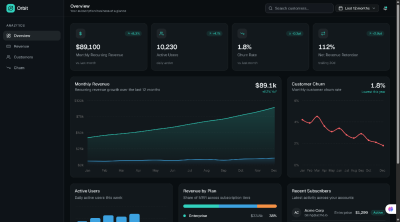
Vercel v0 introduces a generative interface builder that allows users to create functional interface components directly from natural language requests on its platform. Instead of assembling visual components by dragging and dropping design elements, users specify the target interface—such as requesting a specialized analytics dashboard—and the platform dynamically writes and renders the corresponding code and layout structure on demand.
3. Goblin.tools: Breaking Down Overwhelming Tasks
Conventional productivity and project management software typically demands significant administrative overhead. Users must create task cards, populate Kanban columns, set priority tags, and continuously update progress markers.
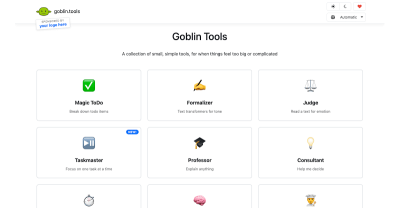
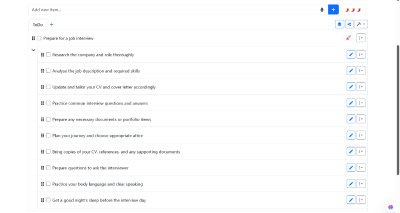
Goblin.tools presents an alternative model focused on task simplification, designed specifically to assist neurodivergent users or individuals dealing with cognitive fatigue. Operating as a single-page suite of single-task AI tools, the platform requires no account setup or structural configuration. When faced with an overwhelming objective—such as preparing for a job interview—a user inputs the broad task, and the system automatically generates a structured breakdown of manageable sub-tasks. By converting general goals into micro-actions automatically, the tool eliminates the manual organizing steps typical of standard task management platforms.
The Core Pillars Of Intent-driven Web Design
Designing usable software without relying on traditional menus, persistent sidebars, and explicit forms requires a fundamental restructuring of interface principles. Industry researchers, including experts at the Nielsen Norman Group, identify three core pillars underpinning intent-driven user interfaces.
1. High-Level Goals and Ambient Context
Instead of relying on explicit user commands for every sub-action, invisible interfaces leverage environmental data and user history to anticipate needs. Aligned with standards set forth in Apple’s Human Interface Guidelines regarding Contextual and Ambient Design, intent-driven systems analyze context parameters—including device status, geographical location, and past interaction patterns—to initiate proactive system responses without demanding manual input.
2. Generative UI
Conventional web architectures display static layouts where every user views identical navigation headers and content structures regardless of their specific intent.
As noted in the Nielsen Norman Group’s research on AI as a distinct computing paradigm, software interaction is transitioning from command-based instruction to outcome specification. This structural change enables Generative UI, a system where user interface components are created dynamically in real time based on immediate context. When a user requests a specific task—such as calculating complex financial metrics—the platform generates a customized visual widget tailored specifically to that calculation, which recedes once the goal has been achieved.
3. Execution by Autonomous AI Agents
Legacy interfaces rely heavily on preventative friction, routinely prompting users with confirmation dialogs and warning modals to prevent input mistakes.
Intent-driven design adapts Jakob Nielsen’s classic Usability Heuristics regarding user control and error recovery by shifting the safety focus from pre-action prevention to post-action reversibility. Because autonomous background agents perform complex operations on behalf of the user, platforms prioritize clear recovery tools. Prominent undo options, simple inline refinement prompts, and transparent execution logs replace repetitive confirmation pop-ups, allowing background automation to proceed without unnecessary friction.
Navigating Hidden Risks and Design Challenges
While eliminating manual interface steps increases efficiency, stripping away visual controls introduces technical, operational, and ethical challenges. When software functions on inferred human intent rather than explicit point-and-click instructions, designers must address distinct usability risks.
The Illusion Of Control
When an interface makes automated decisions on behalf of a user, it risks feeling patronizing or overly intrusive. Research from the Stanford Human-Computer Interaction (HCI) Group stresses that automated systems must maintain clear operational boundaries to preserve user agency. Furthermore, ethical design frameworks published by the Center for Humane Technology warn against implementing manipulative default settings within highly automated software.
To address these risks, UX designers must differentiate between routine tasks and sensitive actions. While low-stakes operational work can be automated fully in the background, high-stakes events—such as executing financial transactions, publishing public communications, or modifying privacy configurations—require explicit human confirmation steps.
The Black Box Problem
In a traditional GUI, diagnosing an unexpected system result is relatively straightforward; users can inspect selected drop-down values, review active filters, or check input fields. In an intent-driven interface, identifying why a system generated a specific outcome becomes significantly more difficult.
To mitigate this opacity, the Google PAIR (People + AI Research) Guidebook recommends building continuous, transparent feedback loops into AI-driven interfaces. Systems must explicitly state their interpretation of a prompt—for instance, displaying an active confirmation string such as "Searching for non-stop flights to Chicago under $300"—allowing users to understand system behavior and correct misunderstandings immediately.
The Evolving Role of the UX Designer
For user experience professionals, the transition toward intent-driven architecture requires a core shift in daily practice. Rather than spending the majority of their time styling buttons, refining form layouts, and structuring static page hierarchies, designers must learn to map and manage dynamic, generative visual elements that adapt dynamically to user intent.
By mastering emerging interaction patterns—including ambient feedback displays, inline prompts, and clear status indicators—designers can ensure that screenless and agent-driven systems remain transparent, manageable, and aligned with human needs.
Rethinking Metrics for an Intent-Driven Web
For decades, the digital industry evaluated product success primarily through engagement metrics, including time spent in-app, click-through rates, and total page views per session. Web platforms were routinely optimized to maximize session duration and encourage continuous visual interaction.
The design philosophy detailed in Golden Krishna’s The Best Interface Is No Interface, alongside the broader Time Well Spent initiative led by the Center for Humane Technology, directly challenges these traditional performance indicators. Under an intent-driven model, the success of a digital product is no longer measured by how visually engaging its interface remains, but by how efficiently it resolves the user’s core objective and gets out of the way. As web platforms evolve from manual visual tools into intent-resolution systems, digital design is moving away from maximizing active screen engagement toward delivering fast, invisible task completion.