Seven and a half years after the block editor made its debut in WordPress Core, the platform is addressing one of its most persistent developer hurdles. With the release of WordPress 7.0, developers can now build functional custom blocks using exclusively PHP—bypassing the need to learn React, configure build pipelines, or manage NPM package dependencies.
Since the introduction of the Gutenberg editor, creating a custom block historically required a dual-registration process. Developers had to register the block structure on the server side using PHP while simultaneously writing client-side JavaScript to handle the editor interface and user interactions. For many developers accustomed to classic WordPress theme and plugin development, this requirement introduced significant technical friction and steep learning curves.
WordPress 7.0 simplifies this workflow by introducing a server-driven block registration mechanism that automatically handles the necessary client-side generation behind the scenes.
A Radically Simplified Block Building Experience
In traditional WordPress block development, registering a block requires maintaining matching configurations across two distinct programming languages. PHP handles server-side rendering and initial registration, while JavaScript handles how the block displays and behaves within the editor canvas.
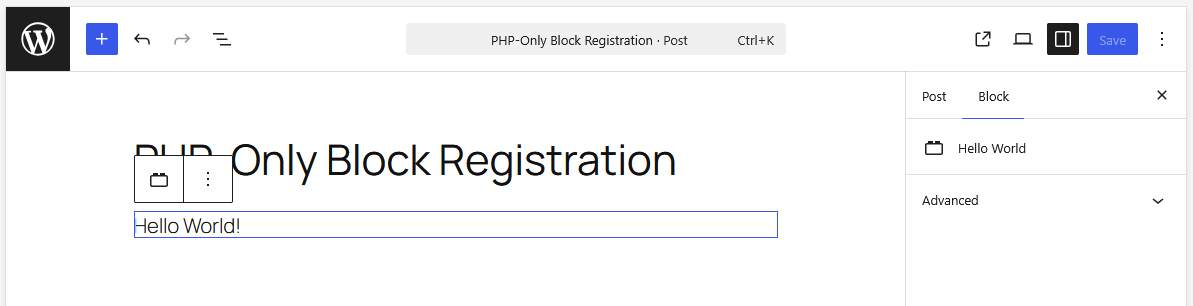
WordPress 7.0 streamlines this process by allowing full block registration entirely within PHP. Under this new model, developers define the block structure using the standard register_block_type function, adding a new configuration flag to instruct the system to handle client-side script generation automatically.
function css_tricks_hello_world_block()
  register_block_type(
    'css-tricks/hello-world',
    [
      'title' => 'Hello World',
      'render_callback' => function ()
        return sprintf(
          '<div %s>Hello World!</div>',
          get_block_wrapper_attributes()
        );
      ,
      'supports' => [
        'autoRegister' => true,
      ],
    ]
  );

add_action('init', 'css_tricks_hello_world_block');
The core driver of this streamlined behavior is the 'autoRegister' => true flag placed within the block’s supports array. When WordPress encounters this flag during initialization, it automatically synthesizes the required client-side JavaScript logic. This auto-generated script registers the block on the client side and manages its editor preview without requiring a single line of custom JavaScript or a compiled build asset.
Managing Attributes in Server-Registered Blocks
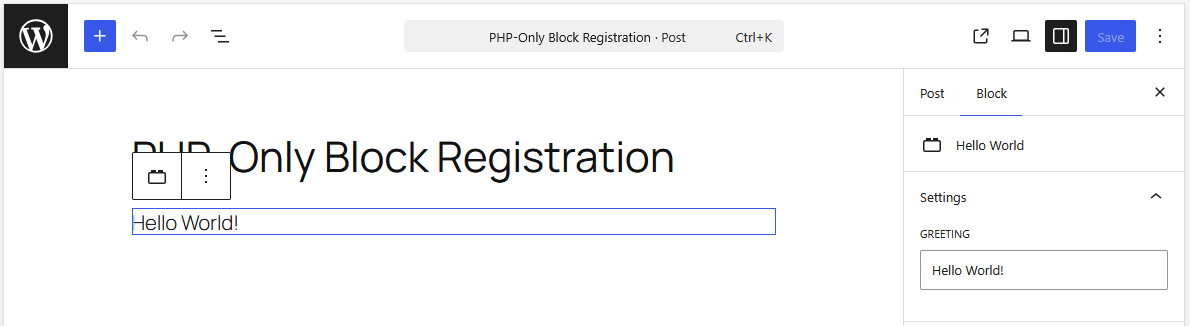
To allow content creators to customize block output, traditional block development requires writing custom React control components within the editor script. With pure PHP registration, attribute management is handled entirely through simple array declarations during the initial server-side registration.
function css_tricks_hello_world_block()

  register_block_type(
    'css-tricks/hello-world',
    [
      'title' => 'Hello World',
      'render_callback' => function ($attributes)
        return sprintf(
          '<div %s>%s</div>',
          get_block_wrapper_attributes(),
          esc_html($attributes['greeting'])
        );
      ,
      'supports' => [
        'autoRegister' => true,
      ],
      'attributes' => [
        'greeting' => [
          'type' => 'string',
          'default' => 'Hello World!',
        ],
      ],
    ]
  );

add_action('init', 'css_tricks_hello_world_block');
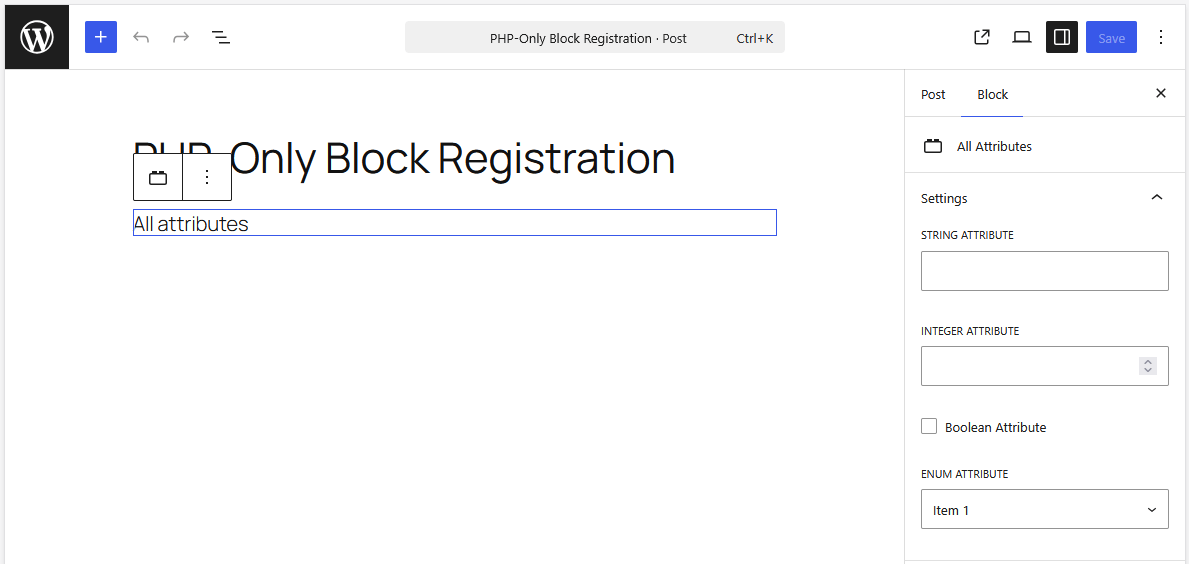
By declaring an attribute—such as a string named greeting with a default value—WordPress automatically builds the corresponding input fields in the block’s Settings sidebar within the editor. While this provides a familiar and lightweight development process reminiscent of classic WordPress programming, the architecture carries notable operational trade-offs.
Architectural Limitations of Server-Rendered PHP Blocks
While PHP-only block registration significantly lowers the entry barrier for custom block creation, the architecture relies on server-side rendering mechanisms that introduce clear boundaries regarding interactivity, data access, and editing interfaces.
Lack of In-Editor Content Interactivity and DOM Manipulation
When a user inserts or modifies a PHP-only block, the block editor does not evaluate the preview locally through a client-side JavaScript component. Instead, the editor requests a rendered HTML snippet from a dedicated WordPress REST API endpoint, which executes the block’s PHP render_callback function and returns the resulting markup.
Because these blocks rely on asynchronous REST API queries to generate markup, they operate outside the single-page React application that powers the block editor interface. This structural design results in two primary operational constraints:
First, developers cannot place interactive editing controls directly inside the editor preview canvas. User interactions are strictly constrained to the auto-generated controls placed inside the block’s Settings sidebar. Traditional block experiences—such as inline text editing or click-to-upload image frames—are unsupported in this paradigm.
Second, attaching custom JavaScript logic to the DOM elements of the editor preview is unreliable. In standard client-side development, JavaScript event listeners are attached to DOM nodes upon rendering. However, because a PHP-only block fetches new markup over the REST API and replaces the DOM content on every state update, any previously attached JavaScript event listeners or DOM manipulations are immediately wiped out when the preview re-renders. While front-end JavaScript scripts function normally on the published site, the interactive editing experience in the admin workspace remains static.
Decoupling from Unsaved Client-Side Data
When an editor page loads, WordPress fetches post data from the database into a client-side JavaScript data store. As a user edits titles, body content, excerpts, or featured images, these updates exist solely within the browser’s temporary memory until the post is explicitly saved.
PHP-only registered blocks bypass this client-side data store entirely. Each time a PHP block re-renders in the editor preview, its callback queries the database directly. Consequently, if a block relies on current post metadata or the post title, it will display stale database values rather than the live, unsaved updates present in the editor canvas. To view updated post data within a PHP-only block, the user must save the draft and perform a full page reload.
Absence of Front-End Loop Context in REST API Requests
Because block previews are rendered via a REST API endpoint, the execution environment differs fundamentally from standard front-end rendering. On the public site, blocks execute within the standard WordPress rendering loop, where global state variables like $post and template tags such as the_title() or get_post_meta() resolve automatically.
In contrast, REST API calls are stateless. Although the REST API endpoint responsible for block preview rendering accepts a post ID parameter, the editor interface currently does not pass the post ID to the endpoint for PHP-only blocks. As a result, standard template tags and post-dependent functions fail to resolve the correct post context within the editor preview in WordPress 7.0.
Restricted Attribute Types and Interface Controls
The initial implementation of pure PHP block registration in WordPress 7.0 supports only three fundamental attribute data types: strings, numbers, and booleans. These data types map to a small set of basic form controls in the editor sidebar: text fields, number inputs, checkboxes, and select dropdowns.
More complex editor controls—including media upload interfaces, rich text editors, or interactive date pickers—are currently unavailable. Furthermore, the selection dropdown control lacks support for keyed arrays, preventing developers from separating user-facing option labels from underlying stored values.
'attributes' => [
  'selected_category' => [
    'label' => 'Select a category',
    'type' => 'string',
    'default' => 'uncategorized',
    'enum' => wp_list_pluck( get_categories( [ 'hide_empty' => false ] ), 'slug' ),
  ],
],
Because key-value mapping is unavailable, developers are forced to store user-editable category slugs or labels directly in the block markup rather than database IDs:

<!-- wp:css-tricks/related-posts "selected_category":"news" -->Relying on text slugs inside stored block markup poses maintenance risks. If a taxonomy term or slug is updated in the future, previously saved blocks referencing the old slug will fail to retrieve matching content, whereas database IDs remain stable over time.
Unlocking Block Theme Adoption Through Legacy Code Migration
Despite these structural limitations, PHP-only registered blocks offer a powerful utility for a specific operational challenge: converting legacy PHP codebases into modern block-based themes.
Overcoming Barriers to Block Theme Adoption
Block themes offer performance and maintenance advantages over traditional PHP template structures. However, development teams managing legacy codebases frequently remain on classic theme architectures due to the high resource costs associated with rebuilding existing custom PHP functionality into React components.
Transitioning legacy features previously required setting up node build environments, configuring compilers, and translating server-side rendering logic into JavaScript. Pure PHP block registration removes these tooling requirements, providing an immediate path to wrap existing template functions, widgets, and shortcodes into server-rendered blocks.

Scope of Migration Candidates
PHP-only block registration is suited for wrapping established server-side components where rich, real-time canvas interaction is unnecessary. Primary migration targets include:
- Dynamic query lists, such as related posts or recent news loops.
- Custom global theme headers, footers, and callout banners.
- Embedded dynamic elements, including newsletter subscription blocks, author bio boxes, and third-party script wrappers.
For these components, exact visual preview accuracy inside the editor canvas is secondary to functional accuracy on the public front end. By encapsulating existing PHP render logic within a server-registered block, developers can adopt block-based theme templates without rewriting core site features.
Practical Strategies for Building Pure PHP Blocks
To maximize the utility of PHP-only blocks within current architectural constraints, several development strategies and technical workarounds can be applied.
Contextual Environment Detection
When a block requires distinct rendering output for the back-end admin canvas versus the public front end, standard environment checks like is_admin() are insufficient because REST API render requests evaluate differently.

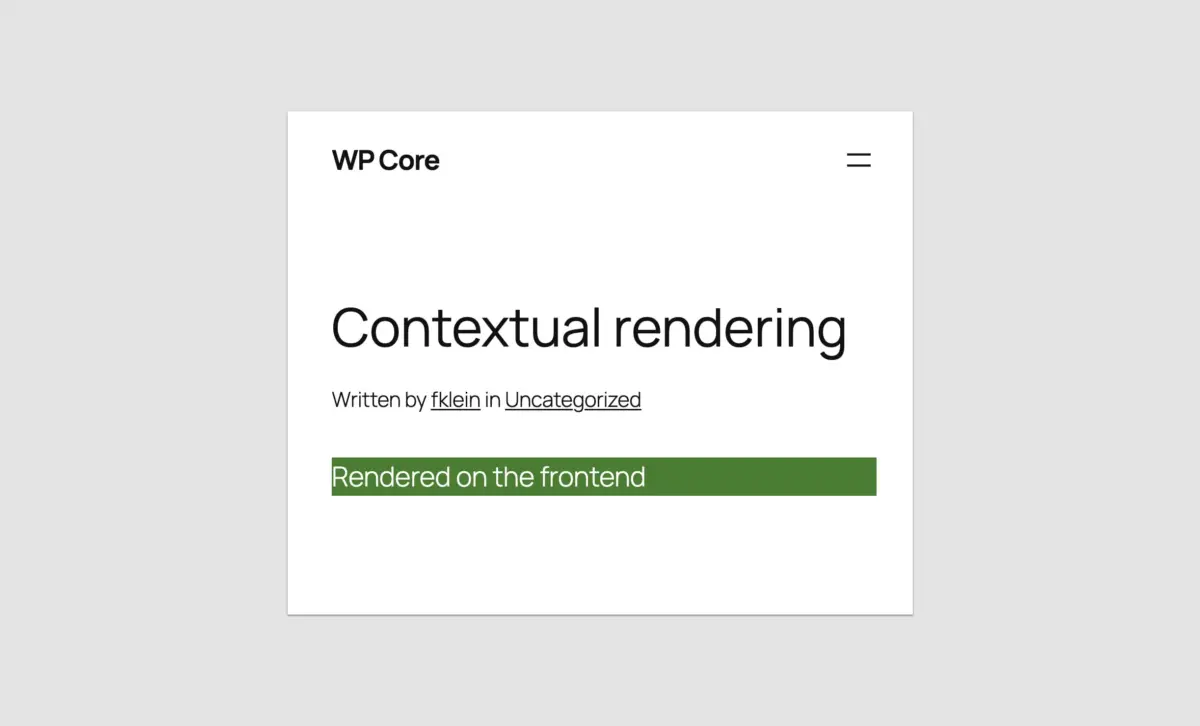
Developers can accurately identify REST-based editor preview requests by evaluating wp_is_rest_endpoint() alongside query parameters targeting the block rendering endpoint:
function css_tricks_php_only_detecting_editor_render()

  register_block_type(
    'css-tricks/php-only-detecting-editor-render',
    [
      'title' => 'PHP-Only Detecting Editor Render',
      'render_callback' => function ()
        if ( wp_is_rest_endpoint()
          && str_contains($GLOBALS['wp']->query_vars['rest_route'] ?? '', 'v2/block-renderer/' )
         )
           $frontend = false;
          else
           $frontend = true;


         $bgcolor = $frontend ? 'green' : 'blue';

         return sprintf(
           '<div %s>%s</div>',
           get_block_wrapper_attributes(['style' => "color: #fff; background-color: $bgcolor;"] ),
           $frontend ? 'Rendered on the frontend' : 'Rendered in the editor'
          );
        ,
        'supports' => [
          'autoRegister' => true,
        ]
      ]
  );

add_action('init', 'css_tricks_php_only_detecting_editor_render');
Retrieving Post ID Context During Editor Execution
Because WordPress 7.0 does not automatically forward the current post ID to the REST rendering endpoint for PHP-registered blocks, developers can capture the post context from the administrative URL parameter during initial editor load and pass it to a localized attribute.
function css_tricks_php_only_post_title_block()

  register_block_type(
    'css-tricks/php-only-post-title',
    [
      'title' => 'PHP-Only Post Title',
      'render_callback' => function ($attributes)
        $post_id = is_int(get_the_ID()) ? get_the_ID() : $attributes['postId'];

        if ($post_id === 0)
          return sprintf(
            '<div %s>Please save the post and reload the page.</div>',
            get_block_wrapper_attributes()
          );


        return sprintf(
          '<div %s>%s</div>',
          get_block_wrapper_attributes(),
          get_the_title($post_id)
        );
      ,
      'supports' => [
        'autoRegister' => true,
      ],
      'attributes' => [
        'postId' => [
          'type' => 'integer',
          'default' => isset($_GET['post']) ? absint($_GET['post']) : 0,
          'role' => 'local'
        ],
      ]
    ]
  );

add_action('init', 'css_tricks_php_only_post_title_block');
Setting 'role' => 'local' ensures that the attribute stores the retrieved post ID for internal evaluation without rendering an unnecessary input interface in the editor sidebar.
Asset Enqueuing and Layout Compatibility
Stylesheets and front-end scripts can be registered and attached directly to server-registered blocks using standard WordPress script handles:

function css_tricks_hello_world_block()

  wp_register_style(
    'css-tricks-hello-world',
    plugins_url( 'style.css', __FILE__ ),
    [],
    filemtime( plugin_dir_path( __FILE__ ) . 'style.css' )
  );

  wp_register_script(
    'css-tricks-hello-world',
    plugins_url( 'script.js', __FILE__ ),
    [],
    filemtime( plugin_dir_path( __FILE__ ) . 'script.js' )
  );

  register_block_type(
    'css-tricks/hello-world',
    [
      'title' => 'Hello World',
      'render_callback' => function ($attributes)
        return sprintf(
          '<div %s>Hello World!</div>',
          get_block_wrapper_attributes()
        );
      ,
      'supports' => [
        'autoRegister' => true,
      ],
      'style' => 'css-tricks-hello-world',
      'view_script' => 'css-tricks-hello-world',
    ]
  );

add_action('init', 'css_tricks_hello_world_block');
Using the style and view_script parameters guarantees that assets are conditionally loaded on the front end only when the block is actively present on the page being served.
Additionally, ensuring that custom blocks adhere to Block API Version 3 guarantees compatibility with the editor’s isolated iframe rendering mode. Iframed editor previews prevent administrative styles from corrupting custom block layouts, establishing visual parity between the editor canvas and the public site.
Leveraging Core Block Supports
Pure PHP blocks can tap into the native Block Supports API to adopt Core capabilities automatically without manual UI construction. Useful configuration options include:
'supports' => [
  'autoRegister' => true,
  'inserter' => false,                  // Excludes block from the public inserter menu
  'multiple' => false,                  // Restricts block to a single instance per post
  'align' => ['left', 'center', 'right'], // Restricts alignment controls to specific choices
  'color' => [
    'background' => true,               // Enables core background color picker
    'text' => true,                     // Enables core text color picker
  ],
],
When supported options are configured, WordPress automatically appends the corresponding wrapper classes and CSS variable rules to the string output generated by get_block_wrapper_attributes().
A Strategic Shift in WordPress Developer Experience
PHP-only registered blocks do not replace JavaScript-driven block development for highly interactive, complex editing interfaces. Rich canvas interactions, real-time client-side data synchronization, and media-heavy editing experiences still depend on JavaScript and React.
However, the introduction of pure PHP block registration in WordPress 7.0 marks a significant structural update to the platform’s developer landscape. By eliminating the necessity of build pipelines, package management, and dual registration for basic dynamic blocks, WordPress Core lowers the friction required to maintain custom sites and modernizing legacy themes. For development workflows previously constrained by classic PHP architectures, WordPress 7.0 provides an immediate bridge into the modern block ecosystem.