CSS-Tricks has officially returned from its hiatus under new ownership, marking a major moment for the web development community. Following a temporary pause in publication, the platform is resuming its regular coverage of front-end engineering, browser engine developments, and web standards updates. Along with the site’s return, the long-standing "What’s !important" editorial roundup is coming back, alongside the formal revival of the CSS-Tricks newsletter after four years. Beginning November 10, these bi-weekly roundups will transition directly to the newsletter format, offering subscribers front-end news, platform updates, and sponsorship opportunities.
As part of the platform’s return, prominent developer Mat Marquis has highlighted a 30 percent discount on the "JavaScript for Everyone" educational course using the promotional code CSSTRICKSFRIENDS.
The publication’s comeback accompanies a dense wave of recent developments across CSS spec proposals, browser release cadences, and layout techniques.
How to Create Background Image Refraction Effects
Developer Preethi Sam recently published a technical demonstration detailing how to render visual background image refraction effects purely through CSS. Refraction effects—traditionally implemented using canvas rendering or heavy JavaScript libraries—can now be achieved with minimal styling declarations.
Crucially, Sam’s technique eliminates the requirement to duplicate image markup in the Document Object Model (DOM) or rely on client-side scripting. Because the approach relies entirely on native CSS properties, the resulting refraction visual can be keyframe-animated smoothly, providing high-performance visual fidelity without introducing extra layout overhead or execution costs.
How to Build Components Using Style Queries and attr()
The capabilities of container style queries continue to expand, offering developers new ways to design modular visual systems. Front-end engineer Brecht De Ruyte showcased modern component architecture techniques by pairing container style queries with advanced applications of the CSS attr() function. This setup allows components to inspect custom attribute values or container conditions directly in stylesheet logic, enabling dynamic styling without requiring utility class toggles or custom scripting.
In parallel, developer Dan Holloran published an analysis examining the emerging scroll-state() container query feature. The spec introduces explicit query targets, including scrollable, scrolled, snapped, and stuck. These queries allow stylesheets to respond directly to the real-time operational state of a scrolling container.
For instance, developers can apply styles specifically when an element becomes fixed against a sticky boundary using declarative container syntax:
@container scroll-state(stuck: top)
  /* Dynamic styles applied when stuck to the top boundary */
This functionality simplifies sticky header behaviors, custom scroll indicators, and snapping interactions by moving state detection natively into the CSS cascade.
The Craziest CSS to Ever Exist
In a historical retrospective on web development practices, Declan Chidlow cataloged some of the most unconventional legacy CSS hacks ever deployed in production environments. A significant portion of these legacy techniques stemmed from early versions of Internet Explorer, which relied on proprietary syntax extensions to implement basic visual styling that lacked standardized web specifications at the time.
Among the historical examples highlighted was Microsoft’s proprietary filter syntax used during the Internet Explorer 5.5 through IE8 eras:
-ms-filter: "progid:DXImageTransform.Microsoft.Alpha(opacity=50)";The retrospective highlights the dramatic progress made in web standards standardization. Modern front-end engineering has largely moved past complex, vendor-locked visual filters in favor of lightweight, cross-browser CSS properties.
How to Animate CSS Grids Using Anchor Positioning
Web developer Bramus demonstrated a practical technique for animating CSS Grid layouts by leveraging the CSS Anchor Positioning specification. Historically, transitioning grid items smoothly during structural layout reflows required JavaScript layout measurements or complex view transitions.
Under Bramus’s approach, individual content elements are anchored directly to their respective grid layout cells using anchor target identifiers. When structural changes cause the underlying grid layout to reflow or shift positions, the browser automatically animates the anchored content element rather than forcing a layout re-render of the grid cell itself.
However, cross-browser implementation tests indicate that this specific layout technique currently fails to render correctly in Mozilla Firefox due to an underlying layout engine bug, though work on anchor positioning specifications remains active across browser vendors.
New HTML Features
Web pioneer Chris Coyier published an overview detailing several emerging HTML platform features that have entered draft specifications or initial browser implementations. The update emphasizes that many modern additions to HTML extend well beyond basic semantic markup, introducing native functional attributes aimed at handling routine client-side tasks directly within markup.
These updates represent a broader platform shift toward reducing developer reliance on client-side JavaScript frameworks for simple UI states, asset preloading, and responsive media handling.
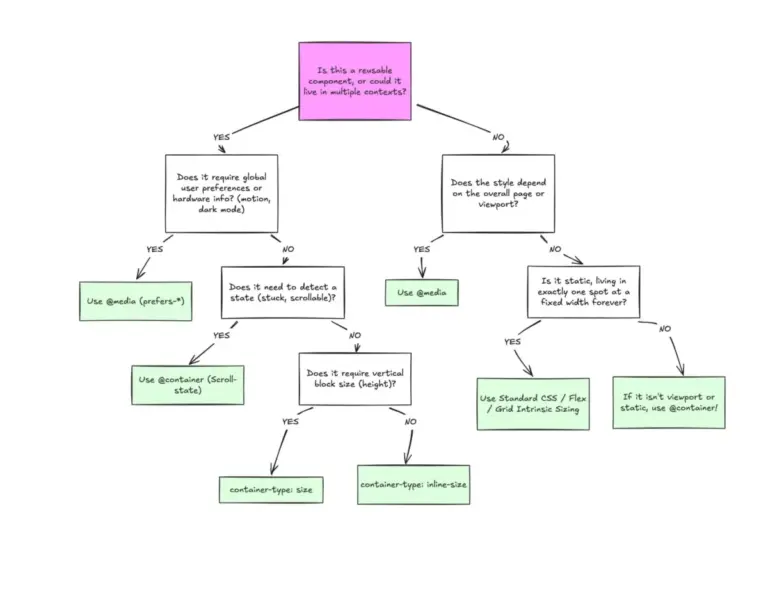
How to Use Container Queries (The Right Way)
Despite container queries ranking among the most requested front-end platform features for years, adoption across production codebases has lagged. Developer Victor Ayomipo examined this gap, asserting that many engineering teams misuse container queries by treating them as direct drops-in for traditional viewport-based media queries.
Ayomipo emphasizes that effective container query usage requires rethinking layout architecture around component-owned boundary constraints rather than global screen dimensions. When developers write container queries with the same global mindset used for viewport queries, they miss out on modular composition benefits.
Complementing this discussion, Cory LaViska detailed technical strategies for pairing @custom-media rules alongside container style queries. This approach allows developers to maintain robust fallbacks for legacy browsers while adopting modular container architectures in modern rendering engines. Additionally, author Declan Chidlow maintains a deep-dive reference on @custom-media specification rules within the CSS-Tricks Almanac.
How to Detect Overlapping Elements
Interface designer Ahmad Shadeed addressed a common dynamic layout problem: detecting when independent interface elements visually overlap on screen. Traditionally, determining spatial intersections between floating or dynamically positioned elements required running ongoing viewport calculations via JavaScript’s getBoundingClientRect() or IntersectionObserver.
Shadeed presented a declarative CSS approach that combines anchor positioning, scroll-driven animations, and container style queries to track element intersections natively.
The primary use case focuses on dynamic visual elements, such as decorative assets placed near content boundaries. Rather than hiding decorative elements preemptively using arbitrary viewport width media queries, the modern CSS technique dynamically detects the precise moment an element visually collides with adjacent section bounds—regardless of fluid sizing or viewport scale—and applies conditional styling immediately upon impact.
Introducing the previewsrc HTML Attribute
Browser engine contributor Patrick Brosset outlined a spec proposal for a new HTML attribute named previewsrc. The proposed attribute aims to standardize low-quality image placeholders (LQIP) directly within the image loading pipeline.
Under the proposal, developers could supply a lightweight preview asset URI directly on the <img> element, allowing browsers to render an instant blurred preview while the full-resolution asset downloads in the background:
<img src="high-res-photo.jpg" previewsrc="low-res-blur.jpg" alt="Sample image" />While the proposal offers a standardized markup solution for image loading states, some front-end engineers have advocated for styling-based alternatives instead. Rather than requiring secondary visual assets via HTML attributes, developers have proposed introducing state pseudo-classes such as :loaded and :not(:loaded). Such pseudo-classes would allow developers to handle loading state transitions, blurs, and placeholder animations natively in CSS without creating extra visual assets.
Custom Borders Demo
CSS author Temani Afif shared a novel technique for generating complex, custom-styled element borders without relying on external SVG image files or nested wrapper elements.
The implementation relies on declaring a transparent native border width, defining the outer boundary geometry using the border-shape property, and pairing a CSS background fill with background-clip: border-area. This forces the background visual to render exclusively within the designated border channel. Currently, experimental support for background-clip: border-area is limited primarily to Chromium-based browser builds.
How to Animate the Background Color of ::selection
Animating the highlight background color of user-selected text via the ::selection pseudo-element has historically been restricted by CSS specifications due to rendering engine constraints. However, web developer Leon Arnott highlighted a valid spec-compliant workaround using CSS Custom Properties registered through @property.
Because browsers permit CSS custom properties registered with explicit syntax types to inherit down DOM subtrees, developers can define an animatable custom color property on a parent element:
@property --selection-bg
  syntax: "<color>";
  inherits: true;
  initial-value: magenta;


body
  transition: --selection-bg 0.5s ease;


::selection
  background-color: var(--selection-bg);
By animating the custom property --selection-bg on a parent element during user interaction, the change flows naturally into the ::selection pseudo-element styling, effectively bypassing the historic restriction against direct selection animations.
How to Randomly Animate an Element Along Another Element
Chris Coyier demonstrated a design implementation that uses CSS mathematical functions—specifically the emerging random() function proposal—to position and move elements randomly along the visible boundaries of neighboring layout elements.
The technique relies on anchor positioning mechanics to calculate explicit edge coordinates of a target element, then feeds dynamic or random offsets into CSS translation transforms. The result allows accent elements or decorative overlays to dynamically track layout boundaries without requiring manual coordinate tracking in JavaScript.
The Root Scroller and How Not to Lose It
A technical article by the team behind Polypane investigated how standard Web styling choices can inadvertently break or hijack the browser’s root viewport scroller (:root / html).
Developers frequently break native root scrolling behavior by applying fixed height constraints (100vh or 100%) alongside overflow: hidden or overflow: auto on the <html> or <body> elements. When the browser loses track of its primary root scroller, users lose important native browser conveniences, including mobile URL bar auto-hiding, overscroll bounce effects, dynamic screen resizing, and accessible keyboard navigation defaults.
The guide outlines how browser layout engines interpret scrolling targets on the document root, recommending that engineering teams allow the native viewport scroll context to handle document overflow rather than nesting fixed-height scroll containers at the top level of the DOM.
How to Disable the Double-Tap-to-Zoom-In Functionality
Web developer Andy Bell highlighted a simple CSS reset utility designed to eliminate input latency caused by touchscreen browser zoom defaults.
When users interact rapidly with interactive elements like buttons or toggle switches on mobile devices, mobile browsers often introduce a short delay to determine whether the user is triggering a single action or performing a double-tap-to-zoom gesture. By applying the CSS property touch-action: manipulation to interactive control elements, developers explicitly instruct the browser engine to ignore double-tap zoom gestures on those targets:
button,
a,
input,
select
  touch-action: manipulation;
This declaration removes double-tap gesture delays, delivering immediate tap responses without breaking standard pinch-to-zoom accessibility settings across the broader page viewport.
New Web Platform Features and Updates
The landscape of browser release schedules has accelerated, with both Google Chrome and Mozilla Firefox maintaining bi-weekly release cycles. Despite initial industry expectations that shorter release windows would produce smaller, incremental updates, recent browser shipments have delivered substantial platform capability upgrades.
In parallel, Apple released Safari 27 across iOS, iPadOS, and macOS. This release synchronizes several web platform specs across all major rendering engines—WebKit, Blink, and Gecko—achieving Baseline interoperability status for several modern features in the same release cycle. These unified platform updates demonstrate strong alignment among browser vendors, making modern CSS, HTML, and browser execution features available for broad production deployment.