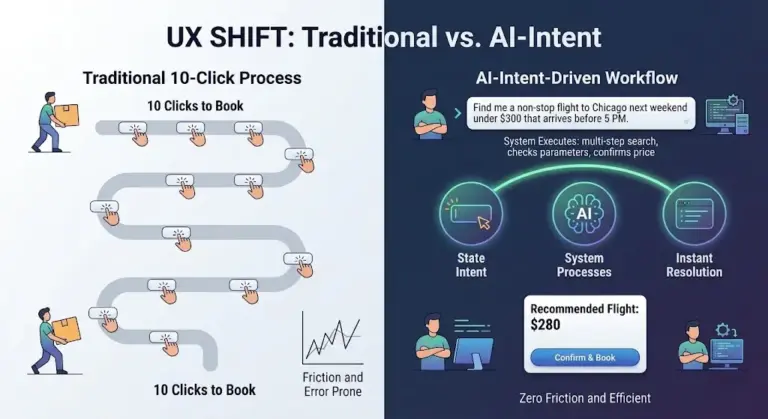
In modern organisations, data saturation has reached an all-time high. Performance decks, real-time analytics platforms, and automated dashboards exist for nearly every business function, from sales pipeline tracking and digital marketing campaigns to product telemetry and operational logistics. With modern business intelligence tools simpler to deploy than ever, access to quantitative information is no longer a bottleneck.
Yet across corporate boardrooms, weekly team standups, and quarterly business reviews, a persistent paradox unfolds: numbers are presented, slides are advanced, heads nod in silent agreement, and the meeting ends without a clear decision or actionable direction.
When dashboards fail to drive action, the underlying dataset typically takes the blame. Teams assume the metrics were insufficiently granular, the sample size was too constrained, or additional reporting tools are required before a path forward can be chosen. However, as user experience practitioner Meriem Benhabiles observes, the data itself is rarely the problem. The true breakdown lies in a fundamental gap between data analysis and user experience (UX) design.
Most dashboards are constructed backward. Charts are built around whatever metrics happen to be readily available in an analytics warehouse, rather than around the specific operational questions leaders need answered. The intended audience is assumed rather than systematically analyzed, and the central objective—identifying precisely what operational change should occur as a result of viewing the display—is frequently omitted from the design process entirely.
Data visualisation and UX design share a common core mission: delivering the right information to the right person at the right moment in a format that sparks meaningful action. When organizations treat data analytics and user experience as unified disciplines, dashboards cease to be passive collections of graphs and become active engines for operational decision-making.
The Chart Was Never The Whole Story
The diagnostic power of data visualisation has deep roots in statistical history. In 1973, statistician Francis Anscombe published a landmark paper demonstrating that numeric summaries alone can be fundamentally deceptive. Anscombe constructed four distinct datasets—now famous as "Anscombe’s Quartet"—that are statistically identical on paper. Each dataset shares the same mean, variance, correlation coefficient, and linear regression line.
If an analyst relies strictly on tabular summaries, the four groups appear indistinguishable. However, plotting the datasets visually reveals radically different structures: one represents a clean linear relationship, another displays a non-linear curve, a third shows a tight linear trend broken by a single extreme outlier, and the fourth exhibits a vertical distribution shifted by a single influential data point. Anscombe’s lesson to the scientific community was clear: visualisation is essential because it reveals the operational truth that raw numbers conceal.
Yet in modern organizational settings, visualization must be more than a diagnostic check for data scientists; it must function as a medium for human communication. The structural format chosen for a metric dictates whether a key insight is grasped immediately or lost in visual noise.
A striking illustration of visual communication is Visual Capitalist’s History of Pandemics visualization. Rather than burying readers in dense tabular rows of historical casualty figures, the visual presentation maps the mortality toll of major global outbreaks across a single timeline using proportional bubble charts. Long before the human brain parses individual text labels or numerical figures, the visual system instinctively comprehends the immense scale of the Black Death relative to other historical health crises. The design choices make the core story immediately understandable.
To guide visual clarity, statician Edward Tufte famously formulated the "data-ink ratio," advocating that every visual mark on a chart must serve the underlying data rather than act as decoration. While Tufte’s principle remains a vital benchmark for stripping away non-essential clutter, Benhabiles emphasizes that visual minimalism must be balanced against context.
A chart is never viewed in a vacuum. It is interpreted by a specific human being, operating under specific time constraints, navigating specific organizational pressures. Stripping a visualization down to its barest components can accidentally remove the exact contextual background an executive needs to make a high-stakes call. The goal of data UX is not radical simplicity for its own sake, but appropriate complexity—calibrating the volume and density of information to match the exact needs of the decision-maker.
Ultimately, data is a message, and the required signal strength depends entirely on who is receiving it. For data designers, the vast majority of high-leverage work—roughly 80 percent—occurs well before drawing a chart or placing a widget on a digital screen.
The 80 Percent That Happens Before The Chart
The critical work that determines whether a dashboard succeeds or fails takes place upstream: before software platforms are booted up, before data pipelines are queried, and before layout wireframes are drafted. This foundational work hinges on answering three core questions regarding context, audience, and insight.
Context: Defining the Question Behind the Data
Data projects often run into trouble by starting with existing tracking metrics rather than operational goals. Teams pull available figures from analytics systems and assemble visual displays, assuming the primary objective will naturally emerge. Because team members naturally anchor on visible metrics as the absolute boundary of what can be evaluated, the broader operational context gets lost.
While defining a clear goal sounds straightforward, it is rarely executed with necessary rigor. A request such as "show how the product is performing" does not constitute an operational goal; it is an open-ended request that yields unfocused dashboards. Conversely, asking "which platform features drive retention among enterprise users who onboarded in the first quarter" establishes a defined scope. It embeds three vital constraints: a target metric, a specific population, and an implied action.
Starting from available metrics produces a passive collection of numbers with no unified purpose. Starting from a constrained operational question ensures that every graphical element earns its place on the screen by helping answer that inquiry.

Consider a digital design team tasked with optimizing a drop-off point in an e-commerce checkout flow. A metric-first approach gathers every accessible data point—click coordinates, page scroll depths, device breakdowns, and geographical distributions—resulting in a dense dashboard that leaves analysts asking what changes to make. A context-first approach begins with a targeted question: "at which step of the checkout sequence do high-intent buyers drop off?" By filtering out irrelevant telemetry, the team can construct a focused funnel chart, instantly isolate friction at the payment selection screen, and immediately execute targeted interface revisions.
Audience: Navigating Literacy and Accountability
Tailoring data displays to an audience requires evaluating two central human dimensions: technical familiarity and organizational accountability.
Familiarity relates directly to data literacy. Some stakeholders read multi-layered statistical graphs instinctively, while others experience cognitive overload when confronted with unconventional charts. Presenting an intricate node-network graph to a commercial sales leader and a senior data engineer is akin to giving the same topographical map to a driver who navigates by recognizable landmarks and a navigator who reads grid coordinates. While the underlying geographic data is completely accurate, it is only functional for one of them.
Accountability dictates how visual complexity must be structured. A chart indicating a 12 percent drop in quarterly conversion carries vastly different psychological weight for an executive directly accountable for revenue targets than for an analyst compiling routine reports. Data is never interpreted neutrally when personal performance or resource allocation is on the line.
Together, familiarity and accountability determine the appropriate density of the dashboard interface. An analyst performing diagnostic research requires a high-density environment where granular nodes and raw user flows can be dissected to uncover subtle patterns. An executive, on the other hand, needs a consolidated display designed for rapid interpretation, allowing them to assess commercial health and make budget adjustments without wading through operational noise. In data visualization, simplicity is not a fixed virtue; the correct degree of density depends entirely on who is reading the screen and what decisions they must make.
Insight: Bridging Information and Action
A common misconception in analytics is that if data is accurate and visual layouts are clean, actionable insights will follow automatically. However, raw information and operational insight are fundamentally distinct. Information describes what the numbers show; insight represents the specific decision, strategy shift, or tactical pivot that occurs as a direct result of interpreting those numbers.
When a dashboard focuses purely on information without defining intended outcomes, organizations often fall into reactive decision-making.
For example, if a company’s core subscription metric suddenly plummets, a basic dashboard designed solely for information sounds an alarm by displaying a sharp 15 percent fall in overall conversion rates. Lacking deeper context, executive leadership may panic, assuming the underlying application is broken or the checkout user interface has failed, triggering an expensive emergency redesign.

A dashboard engineered for insight isolates the necessary variables to guide a rational response. Rather than presenting an isolated drop in conversion, an insight-driven layout plots the decline alongside incoming traffic source cohorts and active marketing campaigns. This reveals that app stability and core user conversion remain entirely steady, but the overall sitewide conversion rate was artificially diluted by a sudden influx of low-intent web traffic generated by a scaled marketing push. Instead of wasting engineering resources redesigning a functional application, leadership obtains the precise insight needed to adjust acquisition channels and realign their ad spend. Every visualization implies a next step; effective design ensures that implication is clear to the viewer.
Transforming Enterprise Telemetry into Actionable Talent Insights
The practical impact of applying UX design principles to data visualization is clearly illustrated in a project involving an enterprise B2B SaaS platform designed for workforce talent management and skill competency tracking.
The platform logged extensive daily telemetry on how enterprise teams interacted with learning modules and acquired certifications in specialized technical domains, such as Pegasystems development. The project brief was broad: the client possessed a massive archive of user engagement logs and needed a comprehensive analytics dashboard for enterprise client managers and team leads.
Rather than building a passive data dump that logged every tracked activity, the design process focused on architecting a decision-making tool tailored to daily operational routines.
Applying the UX Framework
To establish the context, the team examined what "performance improvement" actually meant for enterprise workforce management. The platform easily tracked time spent logged into learning modules—a metric routinely displayed on corporate learning dashboards. However, time spent is merely a proxy metric; it indicates presence, not genuine skill mastery.
Instead, the design prioritized true indicators of capability: competency distribution across domain areas, certification milestone completion rates, and longitudinal skill retention trajectories. Time-spent tracking was retained purely as a supporting metric to evaluate whether low competency in a specific technical area stemmed from underutilized learning resources.
The team also evaluated audience requirements, recognizing that individual enterprise developers and senior department managers required vastly different user interfaces.
Rather than deploying a single dashboard layout with basic data filters—a common design shortcut—the project introduced tailored visual environments. The individual contributor interface was designed as a self-directed mirror, giving developers clear, granular feedback on their technical strengths, pacing against quarterly targets, and specific skill gaps.

Conversely, the team lead interface bypassed granular individual logs in favor of a macro view of team capability risks. This allowed managers to monitor overall technical readiness, identify systemic competency bottlenecks across projects, and drill down into individual profiles only when direct support was needed.
To drive actionable insights, the interface incorporated a side-by-side comparison view, allowing managers to evaluate two team members against identical competency benchmarks simultaneously. This gave team leads clear visibility into balance issues across project pods, transforming monthly performance post-mortems into proactive weekly resource planning.
+-----------------------------------------------------------------------+
| COMPETENCY ASSESSMENT: INDIVIDUAL VS. TEAM PROFILE                    |
+-----------------------------------------------------------------------+
|                                                                       |
|  [RADAR CHART DISPLAY]                     [BAR CHART DISPLAY]        |
|                                                                       |
|         Architecture                       Architecture  [========]   |
|         /                                 Security      [====]       |
|    Security      Integration               Integration   [======]     |
|       |              |                     Database      [=======]    |
|   Database       DevOps                    DevOps        [=====]      |
|                   /                       QA Testing    [=======]    |
|        QA -- Systems                       Systems       [======]     |
|                                                                       |
|  * Radial layout exposes profile           * Linear layout forces     |
|    asymmetry and systemic gaps               bar-by-bar scanning      |
|    in a single, unified visual shape.        to calculate variance.   |
|                                                                       |
+-----------------------------------------------------------------------+
Designing Mental Models and Evaluating Results
A central challenge in the project was enabling users to instantly evaluate multidimensional skill balance across eight distinct technical domains.
In a traditional interface, this data might be presented as a vertical bar chart displaying eight parallel indicators. However, comparing eight individual bars forces the reader to scan back and forth visually to calculate variance across categories.
To create a intuitive visual shape, the team implemented a radial radar chart utilizing polar coordinates, mapping all eight competency dimensions along axes radiating from a central point. When mapped in this concentric fashion, balanced skill proficiency forms a wide, symmetrical polygon, whereas critical skill gaps create a sharply skewed shape that draws immediate visual focus. When all evaluated variables share a standardized scoring metric, the radar chart provides a highly functional layout for multidimensional balance assessment.
Color systems were also established early in the architecture phase. Rather than treating color as a late-stage aesthetic layer, specific visual hues were assigned to core product branches within the underlying data model. These visual cues were maintained consistently across every chart, filter tag, and secondary drill-down view, establishing an intuitive visual hierarchy that users understood instinctively without explicit onboarding instructions.
The operational shift produced clear, measurable outcomes. Following the deployment of the audience-tailored analytics interfaces and side-by-side comparison features, weekly active engagement with the platform’s analytics suite increased substantially, according to internally reported usage metrics. Rather than logging into the system once a month to pull static reports for human resources, department managers began accessing the dashboard every Monday morning to structure project assignments for the week ahead.
Client account metrics reflected similar positive trends over subsequent quarters, with platform churn dropping to historical lows. Crucially, qualitative feedback confirmed that team leads were utilizing the visual insights to identify slipping skill progression early, allowing them to schedule supportive check-ins long before project deadlines were compromised.

Structuring Visualisation as an Upstream Architectural Priority
Data visualization achieves its full potential when visual layout choices are treated as strategic upstream architectural decisions rather than superficial formatting steps at the end of a project.
By applying structured user experience thinking—rigorously clarifying context, analyzing audience literacy and accountability, and designing explicitly for actionable operational insights—organizations can transform passive charts into functional tools for decision-making.
Before opening analytics software, drafting wireframes, or querying database records, product teams and data analysts should step back from the canvas and focus on the human decisions behind the screen. Only then do dashboards stop acting as historical logbooks and start serving as reliable guides for future action.