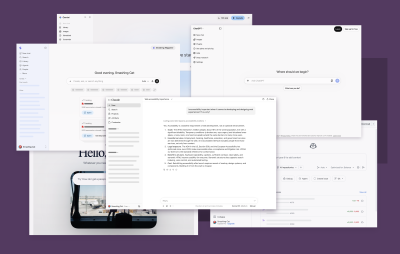
As artificial intelligence tools become deeply integrated into everyday digital workflows, web platforms are rapidly adopting full-screen Large Language Model (LLM) chat patterns. From commercial applications like OpenAI’s ChatGPT, Anthropic’s Claude, and Google’s Gemini to specialized developer tools such as GitHub Copilot, enterprise platforms like Glean, and public sector portals like America.gov, chat-based interaction has swiftly emerged as a primary interface for information retrieval, task automation, and software engineering.
However, digital accessibility specialist Eric Bailey warns that the rapid deployment of these immersive conversational environments risks creating severe digital barriers if web accessibility is not treated as a foundational requirement.
Digital exclusion in the context of modern artificial intelligence carries far-reaching consequences. When interactive interfaces fail to accommodate individuals who rely on assistive technology, the result is a direct loss of access to knowledge, employment opportunities, basic digital utility, and professional independence. Because many immersive web applications are built with standard web technologies and packaged inside native desktop wrappers using frameworks like Electron or Tauri, accessibility implementations applied at the web layer directly impact both browser-based and native application ecosystems. To prevent widespread exclusion, product teams must re-evaluate how chat interfaces communicate state changes, structure semantic markup, and manage non-visual keyboard navigation.
Reframing Chat Interfaces Through the Social Model of Disability
Viewed through the framework of the Web Content Accessibility Guidelines (WCAG), conversational user interfaces do not represent an entirely unprecedented category of software. They remain interactive applications constructed with web standards, subject to the same compliance requirements and legal liabilities as conventional web applications. The barrier to entry lies not in the underlying machine learning algorithms, but in how software teams facilitate—or fail to facilitate—the fundamental interaction loop of submitting a prompt and reviewing a generated response.
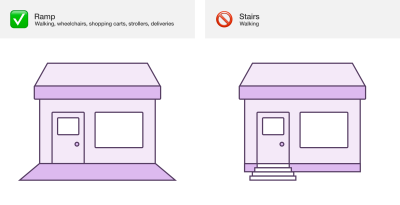
This engineering challenge directly intersects with the social model of disability, which posits that disability is created by environmental and architectural barriers rather than individual physical or sensory impairments. Just as physical storefronts exclude individuals when designed with stairs instead of an accessible sloping ramp, digital applications create exclusion when their interactive designs rely exclusively on visual feedback mechanisms. For an LLM chat application, the primary activities—reviewing past conversations, composing prompts, monitoring response generation, and reading outputs—are well established. Building accessible interfaces requires ensuring that these interactions are equally functional regardless of whether a user interacts visually, aurally, or through keyboard navigation.
Overcoming Visual Bias in Interactive Applications
Software development frequently suffers from an overwhelming visual bias. Because engineering and design teams predominantly operate in visual mediums, user interface designs naturally reflect visual assumptions. In an LLM chat interface, a sighted user relies on immediate visual feedback: watching text stream across the screen word by word, observing animated icons indicating that the system is processing, or recognizing message ownership based on left- or right-aligned speech bubbles.
For screen reader users, these visual updates are silent unless explicitly exposed through accessibility APIs. A user who cannot see the screen remains unaware when an AI model finishes generating text or enters a prolonged processing cycle, because keyboard focus typically remains anchored within the prompt input field. Without dedicated technical interventions, the screen reader experience becomes unresponsive, leaving users uncertain whether the application is processing their request, waiting for input, or frozen entirely.
Implementing Effective Live Region Announcements
To create an equivalent experience for screen reader users, developers rely on ARIA live regions—dynamically updated Document Object Model (DOM) elements that broadcast text changes to assistive technologies without shifting keyboard focus away from the prompt input field. However, implementing live regions in conversational interfaces requires careful technical execution to prevent overwhelming users with fragmented or conflicting audio broadcasts.
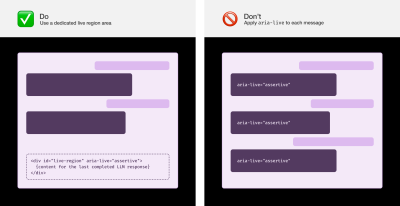
A common pitfall in chat interface design is applying aria-live attributes directly onto individual message elements as they are dynamically inserted into the DOM. This approach often leads to inconsistent performance across different browser and screen reader combinations. Instead, accessibility standards advocate for establishing a single, dedicated live region container placed at the very end of the DOM structure. Centralizing dynamic updates within one permanent live region ensures far greater stability across assistive technologies.
Furthermore, the timing of live region broadcasts is critical when handling streaming text. Because LLMs generate responses token by token, attempting to announce text as it streams results in rapid, stuttering, and unintelligible speech output. The recommended practice is to wait until the model completes its response entirely, at which point the full message content is pushed to the dedicated live region for a single, clear broadcast.
Managing processing states during delayed requests presents additional architectural considerations. Complex LLM queries often involve lengthy multi-step operations such as web searching, code execution, or multi-step reasoning. When loading indicators or status messages appear visually on screen, companion live region announcements must communicate these updates to assistive tools. Triggering an initial "Loading" or "Thinking" announcement five seconds after prompt submission strikes an effective balance, providing reassurance without creating excessive audio clutter. If processing continues, repeating status updates every five seconds—and occasionally rotating through descriptive phrases such as "Researching" or "Planning"—ensures users know the system remains active until the final response finishes streaming and is announced in full.
While the web platform is evolving toward native browser messaging APIs such as ariaNotify(), engineering teams are advised against relying on them exclusively for current production applications. Despite emerging cross-browser availability, inconsistent screen reader adoption and polyfill constraints mean that traditional, established ARIA live region techniques remain the most reliable approach for production environments.

Navigational Architecture: Headings, ARIA Landmarks, and Keyboard Control
Navigating extensive chat logs presents significant usability challenges for non-visual and keyboard-only users. Because screen reader users heavily depend on document headings to scan and navigate web pages, inserting visually hidden headings before each chat message transforms a chaotic stream of text into an easily navigable document outline.
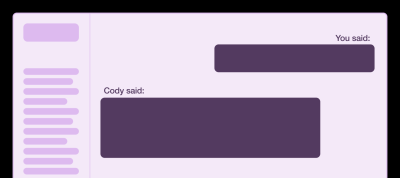
Using visually hidden heading elements—styled with utility classes such as sr-only and configured with tabindex="-1"—allows developers to explicitly state message ownership. Prefixes such as "You said:" or "Agent said:" provide non-visual parity with the spatial alignment used in visual UI design. Users can skim backward through a long conversation using standard heading navigation shortcuts, instantly identifying who authored each message and when it was posted.

At the macro level, ARIA landmark regions should be used to define the overall structural layout of the application, such as separating session navigation (nav), primary content (main), prompt controls (form), and secondary utility panels (aside). However, developers should avoid wrapping individual chat messages in landmark containers like <section>. In long-running chat sessions, doing so pollutes the screen reader’s landmark menu with dozens of repetitive entries, turning routine layout navigation into an arduous task.
To complement heading structures, immersive applications should incorporate dedicated skip links at the start of the DOM, allowing keyboard users to bypass navigation sidebars and jump directly to the primary conversation or prompt field. Furthermore, conversation session lists in sidebars benefit from being implemented as ARIA composite widgets. In a composite widget, keyboard focus moves into the container with a single Tab keypress, after which users navigate between session items using the Up and Down arrow keys. This design dramatically reduces physical fatigue for individuals with motor disabilities, eliminating the need to press Tab dozens of times to move past a lengthy chat history.

For power users and desktop-oriented workflows, supporting legacy keyboard navigation patterns like Control + F6 can significantly enhance efficiency. By binding key combinations to cycle focus directly between structural landmarks—such as hopping immediately from the prompt text area to the visually hidden heading of the latest AI output—developers enable rapid keyboard-driven iteration without requiring manual focus traversal through intermediate UI controls.
Designing for Cognitive, Auditory, and Visual Preferences
Customization is central to accessible design, as user requirements vary widely across cognitive, visual, motor, and auditory spectrums. Immersive LLM interfaces should incorporate granular user settings to accommodate these diverse needs.

In complex AI platforms where models output technical sub-task disclosures—such as search execution, file reading, or command execution—announcing every operational step via live regions can cause cognitive overload. Providing settings toggles that allow users to select announcement granularity ensures that individuals can silence secondary system updates while keeping main chat messages active. This capability maintains experience parity by allowing users to choose between a streamlined summary and an information-dense live feed.
Visual and auditory preferences are equally vital. Fast streaming text, expanding side panels, and animated loading indicators can disrupt focus for users with cognitive or attention-related conditions. Software applications should support options to disable UI animations, defaulting to reduced-motion behaviors whenever the operating system signals a prefers-reduced-motion flag. Similarly, sound effects accompanying message receipts or completion states should be individually toggleable, preventing unexpected auditory disruptions for users relying on screen readers or listening to background white noise to maintain focus.

Additionally, applications that implement custom keyboard shortcuts must allow users to rebind or disable these shortcuts entirely. Rebindable controls protect against conflicts with specialized screen reader commands and ensure usability across non-English keyboard layouts, where single-key shortcuts can accidentally trigger unintended operations.
Optimizing Special Content for Speech Engines
Specialized content types generated by LLMs, such as structured tables and multi-line code blocks, introduce distinct challenges when processed by speech synthesizers. When flattened into plain text strings inside live region broadcasts, tables lose column-row relationships and sound disorienting. Similarly, long code snippets read character-by-character become unreadable voice output.
To solve this, live regions can be programmed to announce concise summaries of structured content rather than raw markup. For example, a data table can be announced as a preview stating its topic, column count, and row count, while a code block can be summarized by its file name and total line count. Because the underlying static DOM elements retain full semantic structure, screen reader users can choose to navigate into the message body after the live announcement to inspect the data with full tabular or syntax semantics.
Ultimately, technical implementations must be validated through direct engagement with disabled users. Relying solely on automated testing or standard compliance checklists often misses practical usability barriers that surface during real-world screen reader or keyboard operation. Inclusive user research ensures that conversational AI platforms move beyond bare regulatory compliance to deliver genuinely usable, equitable experiences across the entire web ecosystem.