A growing paradox in enterprise software development has emerged: artificial intelligence features designed to save users time are frequently forcing them to spend equal or greater effort checking the technology’s output. To address this issue, product design teams are implementing structured audit frameworks to determine where AI genuinely adds value and what verification mechanisms users require before deployment.
The friction between automated promise and practical utility was recently illustrated by a product team at a major health insurer. The team developed an artificial intelligence tool to write complete benefit appeal determination letters for claims specialists. While the underlying technology operated precisely to specification, user adoption collapsed. Specialists who continued using the tool spent more time completing each case than those who bypassed the feature entirely.
An evaluation with the insurance specialists quickly identified the operational bottleneck. Reviewing an AI-generated determination letter with sufficient rigor to sign off legally took roughly the same amount of time as writing the document from scratch. Furthermore, specialists were forced to audit the text for unexpected errors they would never make themselves. Rather than streamlining operations, the feature imposed additional administrative overhead on a core task the employees had already mastered.
The product team ultimately resolved the issue by narrowing the scope of the feature. In a revised release, the AI was repurposed to index and surface relevant policy provisions and past administrative decisions associated with each appeal, leaving the actual writing to the specialists. Under the restructured workflow, the manual search phase was eliminated, case review times dropped significantly, and the specialist’s core professional expertise remained central to the process.
Although the underlying underlying technology remained identical across both iterations, the operational outcome shifted dramatically based entirely on which specific step of the task the AI managed.
Finding the Break-even Line
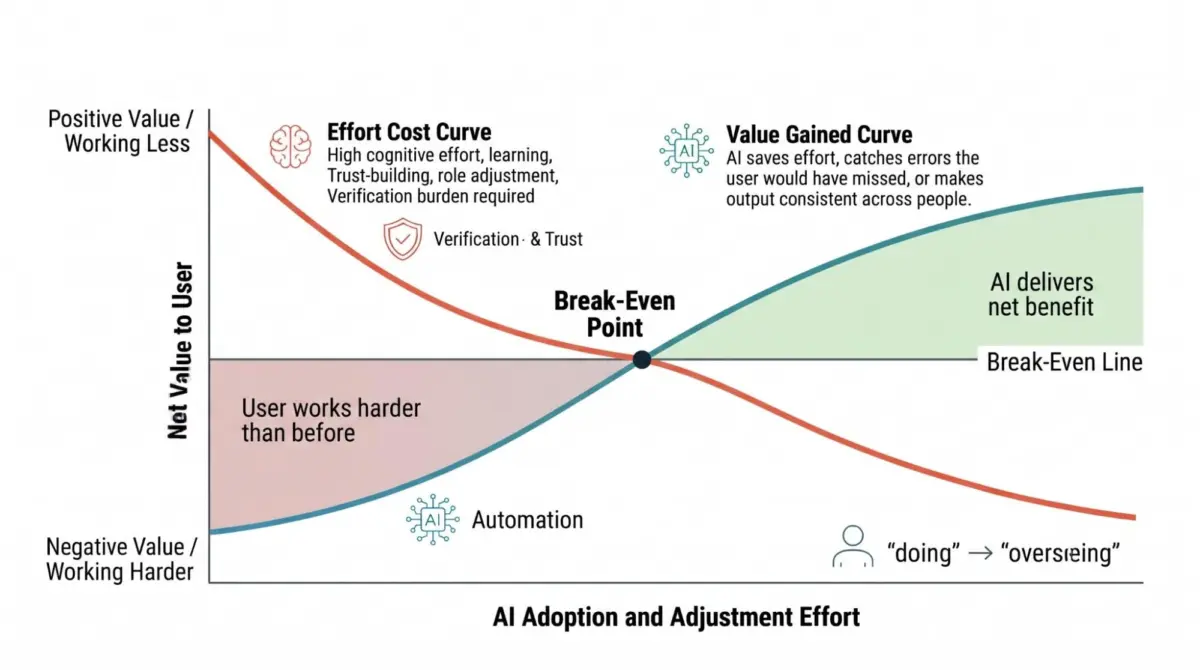
Every modification to a user interface imposes an initial cognitive cost before delivering operational returns. Users must mentally reconstruct their understanding of how a software tool operates, locate updated features, and continuously assess how far they can trust automated outputs.
Cognitive research underscores the narrow margins of human attention. In a landmark 2001 review of working memory literature, researcher Nelson Cowan demonstrated that the human mind can hold only about four information items in short-term storage simultaneously. Redesigning workflows or introducing automated systems draws directly from this limited mental capacity.
In enterprise software environments, integrating an AI feature demands far more cognitive effort from users than a simple menu redesign because it fundamentally alters daily job functions. When automated tools assume responsibility for synthesizing data, the human worker is recast as a reviewer. When the tool also generates recommendations, the employee’s role shrinks to approving decisions.
These shifts require substantial user attention and can undermine professional identity among specialized workers. In a 2025 study led by Sophia Ackerhans, researchers evaluating physicians asked to sign off on AI-assisted medical decisions found that automated recommendations posed a distinct threat to professional identity. Notably, providing clear explanations of the AI’s underlying reasoning increased both user trust and the perceived threat to professional autonomy at the same time.
Within product design, an AI feature effectively earns its place only when the functional return it delivers outweighs the adjustment effort required from a user completing a specific task. This balance represents the feature’s operational break-even line.
Functional returns to users typically manifest in three key forms:
- Effort reduction: Decreasing the physical or mental exertion required to complete a task.
- Speed gains: Significantly reducing total task completion time.
- Higher error-catch rates: Identifying critical anomalies or mistakes that manual review would reliably miss.
An AI-powered fraud screening tool exemplifies the error-catching model. Analysts reviewing automated flags are required to spend cognitive energy inspecting anomalies they would not have independently identified. However, because the system catches high-stakes fraudulent activity at a superior rate, the net return justifies the attention cost, positioning the feature comfortably above the break-even line.
To locate this break-even threshold before design work begins, product teams can evaluate four foundational questions. While these questions do not replace broader strategic considerations such as corporate funding or long-term product roadmaps, they establish clear design conditions for feature briefs.
Executing this audit requires participation from professionals who perform the targeted task daily—such as loan officers, data analysts, or benefits specialists. Brief consultations with active practitioners reveal where mental friction sits and clarify whether a proposed feature eliminates workload or creates an uncompensated burden.
Evaluating Net Cognitive and Operational Effort
Question 1: Does This Reduce the Total Effort the Task Takes for This User?
Assessing effort requires evaluating every demand a workflow places on a user, including visual interaction, analytical thinking, and the post-generation auditing required once AI is introduced. Reducing physical clicks does not automatically equate to reduced effort; an interface can streamline navigation while substantially increasing mental load.
For instance, a loan officer reviewing 40 detailed financial disclosures to identify three items conflicting with lending policies experiences high cognitive strain. An AI tool that automatically extracts and highlights those specific policy conflicts directly reduces mental demand.
Conversely, automatically pre-filling a standard loan identification number into a tracking system saves only a few seconds of minimal exertion. However, because the officer must still manually verify that the pre-filled data is correct, the feature simply shifts cognitive work from input to auditing rather than removing it. This scenario illustrates how conventional software advice—to systematically automate repetitive tasks—can misfire when applied to low-effort inputs that require validation.
The net utility of an AI feature also varies based on user experience. A feature that clears the break-even line for a junior employee may fail for a senior professional. Providing a junior analyst with an AI-generated risk summary offers a valuable baseline that they may lack the experience to construct independently. However, a senior analyst evaluating the same draft will mentally check the automated text against their established domain knowledge, spending four minutes reviewing output that yields no new insight.
Design Condition: Product briefs must explicitly identify the target user segment the feature serves and provide an explicit exit path or disable option for user groups who derive no net benefit.
Competing with Established Workflows
Question 2: Does This Beat the Way the User Does the Task Now?
Evaluating automated features requires comparing the proposed AI workflow against the user’s existing methods, including customized spreadsheets, macro shortcuts, and informal workarounds.
Artificial intelligence routinely demonstrates superior performance when tasks involve high ambiguity, broad option exploration, complex pattern recognition across massive datasets, or when output consistency across large teams is paramount. The technology also excels at flagging subtle anomalies that manual workflows consistently miss. However, automated advantages evaporate when a skilled user already possesses a direct, practiced route to a known outcome.
This divergence was observed by an enterprise human resources team developing an internal talent management tool. When applying AI to analyze employee databases and surface candidate skill profiles that managers would not think to search manually, the tool succeeded. The task involved high ambiguity, massive scale, and no single correct answer, making manual analysis inefficient.
Conversely, using AI to draft routine notification emails once a candidate was selected proved counterproductive. HR managers already completed these standard emails within two minutes using familiar templates, and maintained specific preferences regarding communication tone. The automated candidate search earned its inclusion, whereas the automated email generator introduced unnecessary software steps into a streamlined task.
Furthermore, dynamic inputs and structured outputs must be designed independently. A task containing genuine operational ambiguity may still require a structured, visual interface rather than a conversational text prompt.
Design Condition: AI components must be removed from any procedural step where the user’s existing manual method reaches a reliable answer quickly and consistently.
Error Visibility and Automation Bias
Question 3: Can the User Catch the Errors?
Because all artificial intelligence systems are prone to errors and hallucinations, product teams must evaluate whether users can reliably detect mistakes, assess the real-world consequences of undetected errors, and confirm that users retain the capacity to perform verification.
Error visibility varies significantly across applications. An AI itinerary generator that lists a museum on a day it is closed presents a low-visibility error; nothing in the textual output signals a mistake, and the traveler only discovers the error upon arriving at a locked door. In contrast, a flight booking tool that schedules a departing leg prior to the arrival of a connecting flight displays an immediate, visible contradiction on screen.
Low-visibility errors are compounded by automation bias. In a comprehensive 2010 review of human factors research, Raja Parasuraman and Dietrich Manzey demonstrated that humans routinely default to automated system outputs even when those outputs are incorrect. This systemic bias persists across high-stakes domains including aviation, medicine, and industrial process control. As user trust builds over time, critical scrutiny declines, sharply reducing the likelihood that errors will be caught.
To mitigate this operational risk, product teams are advised to map a feature’s error surface prior to UI design by identifying the primary error models, rating their visual prominence, and assessing the consequence of failure.
Establishing provenance—showing users precisely where data originated and how the system reached its output—allows user trust to calibrate correctly. When users can inspect source materials, underlying data points, and retrieval timestamps, error detection rates improve significantly. Telling a traveler that business operational hours were pulled from a cached page from several months prior gives them clear context to verify the detail independently, whereas an unverified summary leaves them blind to risk.
Design Condition: Any automated feature featuring high-consequence, low-visibility error potential must ship with detailed source provenance displays and visual verification prompts. Otherwise, the feature should not be deployed.
Long-Term Skill Atrophy and Judgment Preservation
Question 4: After a Year of Using This, Can the User Still Tell When the AI Is Wrong?
Automating routine operational tasks offers clear organizational advantages. Protecting a specialist’s manual ability to format documents or calculate routine spreadsheets by hand is rarely a productive use of resources. However, retaining the human judgment necessary to identify system errors remains essential for long-term operational safety. Disuse degrades critical analytical skills over time.

Research in clinical diagnostics illustrates how rapidly automated suggestions can influence expert judgment. In a 2023 study conducted by Thomas Dratsch and colleagues, 27 radiologists evaluated mammograms alongside an experimental AI support tool. Participating radiologists initially completed a 10-image training sequence where automated prompts were accurate, followed by 40 test mammograms containing incorrect AI suggestions inserted into 12 cases.
The results demonstrated that incorrect AI suggestions significantly impaired diagnostic accuracy across all experience levels. Experienced radiologists averaging 15 years of practice correctly categorized cases 82.3 percent of the time when AI prompts were accurate, but their accuracy plummeted to 45.5 percent when presented with incorrect AI prompts. Less experienced radiologists saw diagnostic accuracy drop from 79.7 percent down to 19.8 percent under incorrect prompts. While professional experience mitigated the drop, it failed to prevent substantial error rates.
Extrapolating these findings over extended periods suggests that delegating decision-making tasks to automated systems weakens the foundational judgment required to verify output quality. When enterprise tools fail after prolonged reliance, organizations often misdiagnose the issue as a technical model failure, when the root cause is the systematic atrophy of human verification skills.
Product teams must determine whether a user relying on an automated tool continuously for 12 months would retain the domain knowledge needed to evaluate system output if the AI were suddenly removed. If the answer is negative, product workflows must integrate ongoing skill-preservation mechanisms, such as periodic blind reviews where users evaluate raw data prior to viewing AI recommendations, or routinely routing a sample of cases through manual processing streams.
Design Condition: Product briefs must mandate specific workflow mechanisms—such as blind evaluations or randomized manual case assignments—that actively preserve human verification capabilities over time.
Evaluating Core Decision Criteria
Product teams can synthesize these four audit dimensions to determine appropriate design interventions. The following framework outlines how evaluation signals dictate specific feature scope and requirements:
- Total Effort Reduction: If a task requires complex synthesis across vast inputs where human analysis creates bottlenecks, AI clears the threshold. If a task follows a direct manual path, or if verifying the AI output matches the cost of performing the work, AI adds effort. Required Action: Define the target user segment and implement an exit option for unserved roles.
- Workflow Advantage: If automated features outperform existing workarounds in handling ambiguity, scale, speed, consistency, or error detection, AI is justified. If manual procedures reliably reach answers quickly, AI creates friction. Required Action: Strip automated features from operational steps handled effectively by existing methods.
- Error Verification: If errors are visually obvious, consequences are minimal, and correction is simple, AI integration is viable. If errors are concealed, consequences are severe, or verification requires skills being automated away, AI introduces risk. Required Action: Mandate detailed provenance tracking and explicit visual verification prompts prior to release.
- Skill Preservation: If AI handles computational volume while humans maintain primary decision-making roles, skill retention remains stable. If AI absorbs decision-making without ongoing quality feedback, skill degradation occurs. Required Action: Embed active verification mechanisms into the daily workflow structure.
Applying these audit criteria clarifies why the health insurance appeals tool failed in its initial rollout. The original version failed to reduce total effort, moving human labor from writing to detailed editing without lowering cognitive load. Appeals writing followed a standardized structure that specialists performed efficiently, meaning the initial tool offered no workflow advantage over established methods.
Furthermore, because errors in benefit determinations carry high compliance and medical risks while remaining hidden within fluent text, the lack of provenance mechanisms compromised safety. By shifting the feature’s scope in version two to indexing policy provisions with full source attribution, the team aligned the software with user needs, preserving specialist judgment while removing search friction.
A contrasting outcome occurs when applying the audit to automated meeting summaries in enterprise communication software. Summaries substantially lower total effort for participants who do not take notes, though verification burdens remain for primary note-takers. Automated tools significantly beat manual note-taking on speed and structural consistency across meetings.
However, because misattributing an action item carries real operational consequences while appearing completely plausible on screen, summary tools require linked source timestamps corresponding to original transcripts. Because summarizing meetings does not degrade critical analytical reasoning skills, no specialized skill-retention mechanism is required. The feature succeeds by combining targeted user segmentation with linked source provenance.
Implementing the Audit Framework in Product Development
To prevent what sociologist Everett Rogers described in 2003 as "pro-innovation bias"—the widespread assumption that deploying new technical capabilities inherently represents progress before practical benefit is verified—product teams are incorporating structured evaluation sessions into early planning phases.
Conducting a pre-design evaluation enables teams to address competitive pressures constructively. Rather than presenting audit results as absolute rejections of AI implementation, design teams can present findings as defined scope requirements.
Framing recommendations around target user segments, precise error risks, and necessary provenance mechanisms converts vague concerns into actionable technical specifications. For example, proposing to scope an automated tool exclusively to junior personnel during onboarding while providing manual fast-tracks for senior staff provides product managers with a balanced roadmap decision.
As enterprise AI adoption expands, human cognitive capacity remains a fixed constraint. Systematically accounting for user adjustment costs, verification overhead, and long-term skill retention allows product teams to deploy artificial intelligence precisely where it delivers measurable operational value.