For the past several years, Australian design platform Canva has aggressively integrated generative artificial intelligence across its entire product ecosystem. Now, the company is changing course by offering users the option to scale back or entirely hide these controversial features. On Thursday, Canva announced the introduction of two new switches designed to rein in generative artificial intelligence for subscribers on both its Free and Pro tiers. One toggle button is designed to hide generative AI features from the user interface, while a second toggle reduces the presence of AI-generated material within the platform’s vast library of templates, graphics, and design assets.
The rollout of these controls marks a notable philosophical shift for a major tech platform in an era where most software companies are forcing generative tools onto their customer bases by default. However, the practical utility of the two buttons varies significantly. The first button, which effectively acts as a generative AI kill switch, may seem largely symbolic to many seasoned users. If a user simply prefers not to utilize AI-powered tools during their creative process, avoiding them is as straightforward as ignoring the dedicated sparkly AI icons embedded within the interface.
The second toggle, however, addresses a much more tangible friction point for the platform’s community. By helping users avoid being overwhelmed by synthetic creations while browsing the extensive template libraries that propelled Canva to global popularity, this control offers genuine utility. It is important to note, however, that this switch does not completely banish AI-generated material from view; rather, it instructs the platform’s recommendation engine to show significantly less of it during searches and discovery phases.

For users interested in utilizing these controls, locating them requires navigating through multiple settings menus, as they are not immediately prominent on the main dashboard. The general AI kill switch is tucked away under the Profile, Settings, and Permissions menus. When a user flips this switch to the off position, Canva’s prominent generative features are hidden across the entire platform. According to the company’s official announcement, these hidden capabilities include popular tools like Magic Expand, which intelligently extends the boundaries of a photograph, and Canva Craft, the proprietary generative image model developed internally by the company. Users retain the flexibility to toggle these features back on at any time should their workflow requirements change.
Despite the comprehensive nature of the kill switch, Canva has chosen not to erase every single automated or machine learning utility from its platform. Certain foundational utilities remain active even when the primary generative AI toggle is disabled. The suite’s popular AI-based Background Remover and Magic Grab—a feature that intelligently isolates an object within a photograph so it can be seamlessly repositioned elsewhere in a design—are classified by the company as assistive editing tools. Because they assist with precision editing rather than generating entirely new synthetic content from scratch, they remain accessible regardless of the user’s AI preference settings.
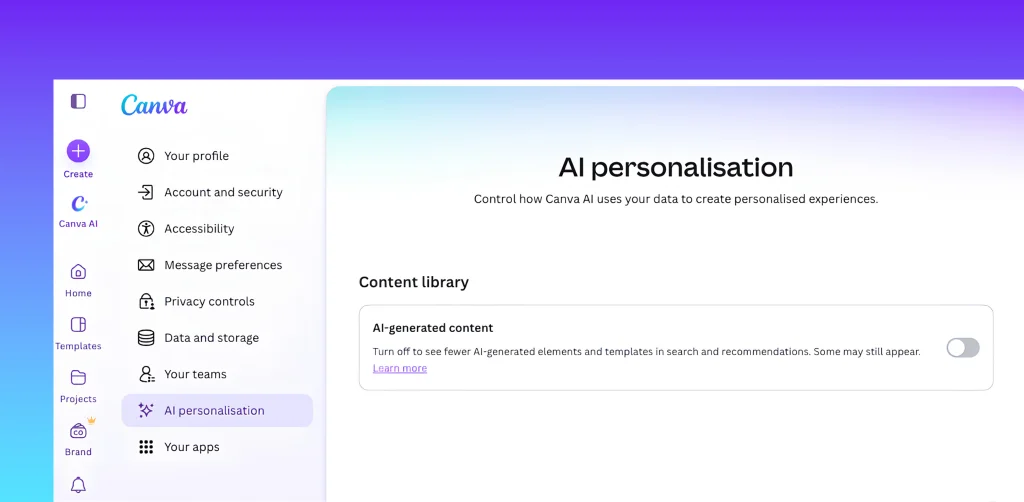
The second control introduced by the company is located under Profile, Your Account, and the AI Personalization menu. When activated, this setting instructs Canva to pull back on the volume of AI-generated material that automatically populates within search results and template recommendations, thereby prioritizing human-crafted assets at the top of the discovery queue. Addressing the composition of its digital catalog, Canva has stated that AI-generated content currently represents only a minor portion of its overall library, primarily consisting of abstract backgrounds and decorative illustrated graphics.
Why, Really
The introduction of this filtration system addresses a growing sentiment among creators and consumers who prefer not to wade through a digital ecosystem saturated with generative AI creations. Furthermore, the policy directly benefits the human artists and illustrators who populate the platform’s marketplace. Canva operates on a compensation model that pays actual human designers each time their specific artwork is utilized within a user’s completed design. By prioritizing human-made assets and reducing the visibility of automated alternatives, the new controls theoretically help steer financial compensation back toward the human creators and illustrators whose work built the foundation of the Canva library.
The launch of these features also serves as a broader temperature check on public sentiment regarding artificial intelligence. Canva explicitly tied the rollout to contemporary public opinion data, citing recent figures from the Pew Research Center indicating that roughly six in ten Americans desire greater personal control over how artificial intelligence impacts their daily lives. In a statement accompanying the announcement, the company emphasized its evolving philosophy on creative technology, stating that the future of creativity should be defined by individual choice rather than being dictated by rapid technological advancements.