Despite reaching broad cross-browser support and standing out as one of the most requested features in the history of web development, CSS Container Queries remain surprisingly underutilized and widely misunderstood across the industry. Recent technical survey data and expert analysis reveal a stark disconnect between developer awareness of the feature and its actual implementation in modern web applications, raising questions about how front-end engineers approach responsive design.
According to data tracking browser capabilities, CSS Container Queries currently enjoy an estimated 94 percent browser support worldwide. Furthermore, the State of CSS survey indicates that 86 percent of responding developers are aware of the technology. However, despite this widespread recognition, only 41.4 percent of developers report actually using container queries in their production code. While developer surveys represent a self-selected sample of the industry, web experts consider these figures the clearest available metric of adoption trends.
Addressing audience members at SmashingConf Amsterdam 2026, prominent web developer educator Kevin Powell highlighted this discrepancy, describing the overall adoption rate of container queries as surprisingly poor. The low adoption rate is particularly paradoxical given that the ability for individual components to adapt dynamically to the width of their immediate parent container—rather than the global browser window—occupied the top spot on developer feature wishlists for nearly a decade.
An examination of modern front-end workflows reveals that low adoption is only part of the issue; misuse of the specification is equally prevalent. Many developers who attempt to implement container queries treat them as direct drop-in replacements for traditional media queries. Because the syntax and structural appearance of container queries closely mimic standard CSS media queries, engineers frequently assume both specifications operate under the same mental model and fulfill identical functional roles. In practice, however, their underlying layout mechanics and architectural purposes are fundamentally distinct.
To understand why container queries were introduced, it is necessary to examine the inherent structural limitations of traditional media queries. For years, web developers rely on CSS media queries (@media) as the primary mechanism for responsive design. Media queries operate by evaluating the dimensions and characteristics of the viewport—the visible browser window.
When a developer writes a standard media query, such as evaluating @media (min-width: 1024px), the browser is asked a simple question: how wide is the screen right now? Media queries answer that question effectively, but the viewport serves merely as a proxy for the space available to individual elements on the page.
This proxy model breaks down within modular component architectures. For instance, if a standardized .card component governed by a standard @media (min-width: 1024px) rule is placed inside a narrow CSS grid cell or a sidebar measuring only 300 pixels wide on a 1920-pixel desktop monitor, the media query still evaluates the total viewport width. Because the screen width exceeds 1024 pixels, the query triggers its desktop layout styles regardless of the constrained 300-pixel container. Consequently, the internal contents of the component deform, overflow, or cramp, creating visual defects.
As Kevin Powell noted in an analysis of smart layout patterns, traditional media queries lack internal context regarding component boundaries. Media queries evaluate global conditions, remaining completely unaware of the actual geometric space allocated to an element within a specific layout node.
For years, web developers approached responsive design primarily as a macro-level system designed to rearrange complete page layouts—such as collapsing a multi-column desktop grid into a single column on mobile devices. However, modern web applications contain diverse display contexts. Empirical data compiled from layout research analyzing over 120,000 data points revealed more than 2,300 unique viewport sizes actively browsing the web. Attempting to manage element layouts across thousands of device variations solely using global viewport breakpoints is structurally unsustainable.
Container Queries Look Inward
CSS Container Queries redefine responsive design by shifting the point of reference from the outside window to the internal available space of a parent element. Instead of querying the viewport width, a container query asks how much horizontal or vertical space is available within a specific container at any given moment.
The specification introduces a clear declaration model. To establish a container context, a developer assigns container properties to a parent element, defining its query type and optional identification name:
.card-wrapper
  container-name: card;
  container-type: inline-size;


@container card (min-width: 450px)
  .card
    display: flex;
    flex-direction: row;
Under this model, the layout behavior of the .card component is completely detached from the global viewport size. The component evaluates only whether its parent .card-wrapper possesses at least 450 pixels of inline space (horizontal space in standard left-to-right writing modes). If the container meets or exceeds 450 pixels, the card adopts a horizontal flex layout; otherwise, it defaults to a vertical block orientation. Whether the parent wrapper is rendered inside a full-screen hero section or a narrow secondary sidebar, the component adapts naturally based solely on its immediate environment.
While the primary focus among web developers remains on container size queries, the W3C specification also encompasses experimental container style queries. Unlike size queries, style queries allow elements to evaluate the computed CSS styles of a container. As documented by front-end engineer Juan Diego on Smashing Magazine, style queries offer potential for conditional component styling based on ancestor property values, though size queries remain the primary production-ready tool for layout responsiveness.
“Macro” Layout Vs. “Micro” Layouts
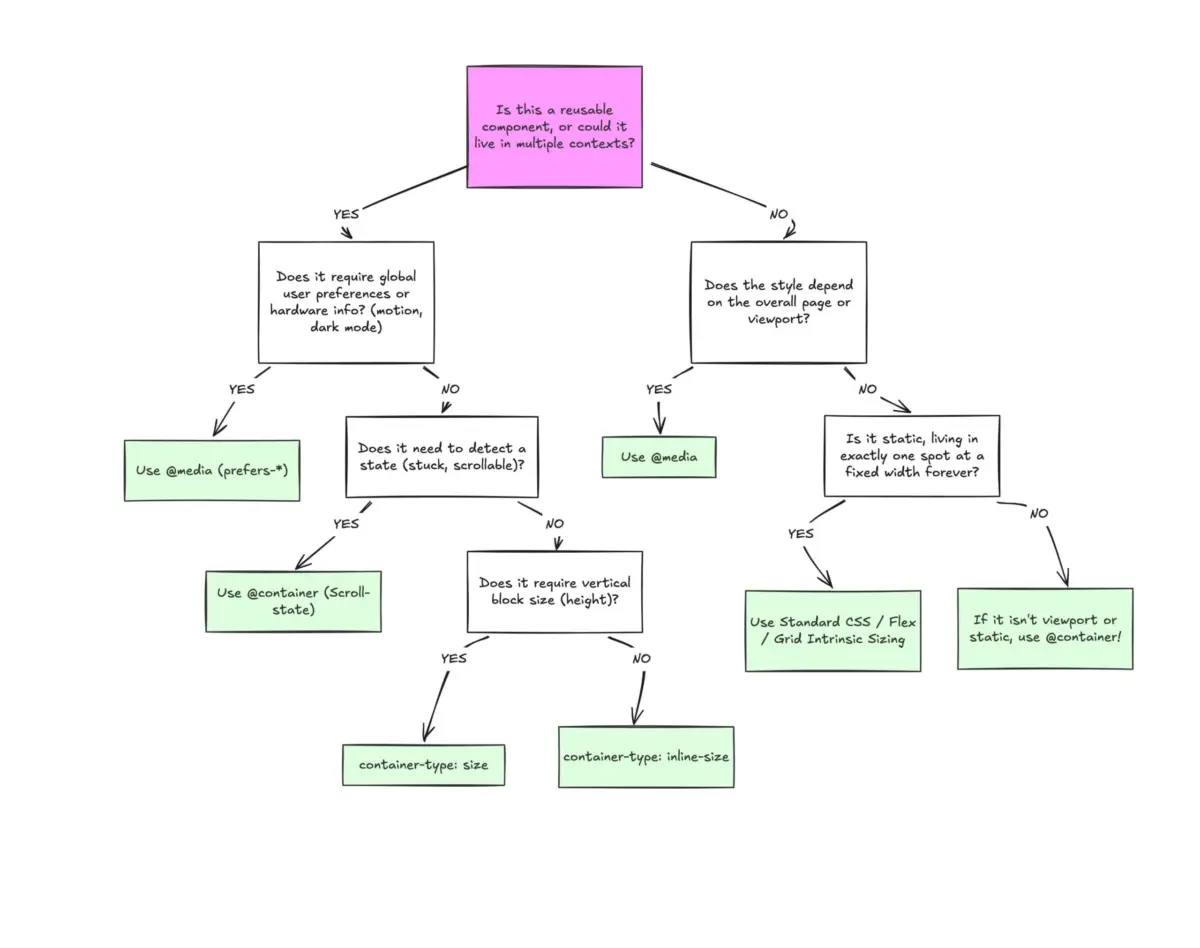
A fundamental principle in modern CSS architecture is distinguishing between "macro" and "micro" layouts when selecting responsive query strategies.
Media queries (@media) are designed specifically for macro-level structural concerns that look outward toward the global user environment. These include top-level page architecture, full-width headers and footers, main page layout grids, user system preferences such as @media (prefers-color-scheme: dark), and physical hardware capabilities like touch capability. These properties represent universal truths about the current browser environment and page container as a whole.
Conversely, container queries (@container) are designed for micro-level component layouts that live inside the macro page structure. Container queries apply when UI elements must adapt flexibly to whatever internal geometry they are assigned. Standard micro-layout candidates include cards, media widgets, embedded form controls, navigation bars, and content lists.
Rather than forcing an element to transform into a "tablet" or "desktop" orientation based on an arbitrary global breakpoint like 768 pixels, container queries enable elements to alter their layout only when their localized container provides sufficient space. The architectural logic moves closer to the component itself, allowing content context to dictate formatting.
Example: Fluid Typography Inside A Component
The practical advantages of container queries extend beyond layout arrangement to property units and typography. Traditionally, developers created fluid typography by pairing the CSS clamp() function with viewport units (vw, vh), scaling text smoothly relative to screen dimensions:

.card-title
  font-size: clamp(100%, 1rem + 2vw, 24px);
While this pattern works effectively for single-context headers, it fails when applied to reusable components. If a card featuring viewport-relative typography is embedded inside a narrow sidebar on a large desktop screen, the 2vw value calculates against the massive desktop width rather than the narrow sidebar. As a result, the title scales to an inappropriately large size relative to its constrained box.
Container queries address this limitation by introducing dedicated container query length units, including cqi (container query inline size), cqw (container query width), and cqb (container query block size). By swapping viewport units for container units inside a clamp() function, fluid typography scales in direct proportion to the component’s parent container:
.card-title
  font-size: clamp(1rem, 0.5rem + 3cqi, 2rem);
By referencing 3cqi, the title font size grows and shrinks smoothly based on the container’s inline width, ensuring predictable, self-contained typography across all placement contexts.
Example: Flexbox Wrap Detection
Container queries also offer native solutions for structural challenges that previously required JavaScript intervention. A persistent limitation in standard CSS flexbox layout (display: flex; flex-wrap: wrap;) is the browser’s inability to declare styles conditionally based on whether flex items have wrapped onto a new line. CSS provides no native :wrapped pseudo-class or @media (flex-wrapped: true) conditional state.
Historically, developers seeking to alter the layout or visual styling of flex items specifically when they wrap were forced to attach JavaScript event listeners, utilizing tools such as ResizeObserver to monitor DOM node dimensions dynamically.
However, using a technique popularized by Kevin Powell, developers can utilize container queries nested within flex items to approximate wrap detection purely in CSS. By defining a flex item as a container and assigning it a growing flex rule (flex: 1 1 390px), the item expands to fill available row space when wrapped, triggering container size thresholds:
/* The flex parent */
.flex-layout
  display: flex;
  flex-wrap: wrap;


/* Register each flex item as an inline container */
.flex-item
  container-type: inline-size;
  flex: 1 1 390px; /* Grow to fill space, wrap baseline at 390px */


/* Default card state (narrow / stacked) */
.card
  display: flex;
  flex-direction: column;
  background: #f4f4f4;


/* State triggered when flex item expands across full row */
@container (min-width: 600px)
  .card
    flex-direction: row;
    align-items: center;
    background: #e2f0d9;
When multiple items fit on a single horizontal row, each .flex-item is constrained to a narrow width, keeping the .card in its default vertical state. When the layout contracts and flex items wrap to individual rows, flex-grow: 1 expands each item across the full available width of the parent container. This width expansion crosses the 600-pixel threshold of the @container query, automatically applying horizontal layout styles without requiring JavaScript execution.
Container Queries Do Have Side Effects
Despite their utility, CSS Container Queries introduce specific layout behaviors, structural rules, and technical side effects that developers must account for during implementation.
First, container queries strictly enforce element separation. A container cannot evaluate its own dimensions to style itself. For example, the following CSS implementation will fail to execute:

/* INVALID IMPLEMENTATION: Element cannot query itself */
.card
  container-name: card;
  container-type: inline-size;


@container card (min-width: 400px)
  .card
    display: flex;
This configuration creates an infinite layout evaluation loop: modifying the display properties of .card based on its own size would continually invalidate the size measurement used to trigger the rule. To query a container, the target elements must be descendants of the registered container node. Developers must structure markup with dedicated parent wrappers:
<div class="cards">
  <div class="card">
    <div class="card-content">...</div>
  </div>
</div>
.cards
container-name: cards;
container-type: inline-size;
@container cards (min-width: 400px)
.card
display: flex;
Unlike container queries, traditional media queries do not require structural parent wrappers because the browser viewport exists independently at the root of the document tree.
A second critical side effect involves layout collapse when setting block-size containment. Declaring container-type: size instructs the browser to evaluate both inline (horizontal) and block (vertical) dimensions of the container. To prevent circular layout dependencies where content height determines container height which determines content styling, the browser isolates the container’s layout calculation from its child content.
If a container configured with container-type: size lacks an explicit CSS height, min-height, or aspect-ratio, its block height instantly collapses to 0 pixels, hiding its internal elements. For this reason, web specifications recommend using container-type: inline-size for standard responsive layouts unless explicit block-height querying is required.
Third, container query conditions currently cannot accept CSS Custom Properties (variables) as breakpoint values:
:root
  --breakpoint-lg: 1600px;


/* INVALID: Custom properties cannot be used in container conditions */
@container (min-width: var(--breakpoint-lg))
  /* ... */
Because custom properties cascade down the DOM tree and can be redefined dynamically within component scopes, evaluating variable dependencies inside container conditional expressions risks unresolvable cyclical evaluation loops.
Integrating container queries effectively requires evaluating architectural scope. Media queries remain the standard choice for global, single-instance layout elements like primary site navigation, master page grids, and user device preference settings. Container queries represent the ideal choice for modular, highly reusable components designed to function seamlessly across unpredictable layout contexts.